Quick answer
- Lead source tracking records the channel, source, campaign and landing page behind every enquiry your business receives.
- Lead source tracking works by reading UTM tags, ad click IDs and the referring website on each visit, then attaching them to the form the visitor sends.
- Asking customers how they heard about you is a useful second opinion, but people forget, guess or pick the first option in the list.
- Google Analytics counts traffic in aggregate, while a lead source tracker ties a source to each named lead so you can count customers and revenue by channel.
- A small business can start in a day: tag the links you control, install a tracker on pages with forms, send a test lead and review the numbers after 30 days.
Lead source tracking is recording where every enquiry came from: the channel (Google Ads, Facebook, organic search, an AI assistant), the source, the campaign and the page the person landed on. It turns “we got 40 leads this month” into “Google Ads brought 18, our Maps listing brought 12 and ChatGPT brought 4”.
For a business owner, that answer decides where the next dollar of marketing goes. Without it, budgets follow whoever reports the most clicks, not whoever brings the most customers.
This guide explains what gets recorded, how the tracking works under the hood, how it differs from Google Analytics and your CRM, which sources to track for your kind of business, and how to read the numbers once they arrive. It ends with a 30-day plan you can follow without a developer.
What does lead source tracking record?
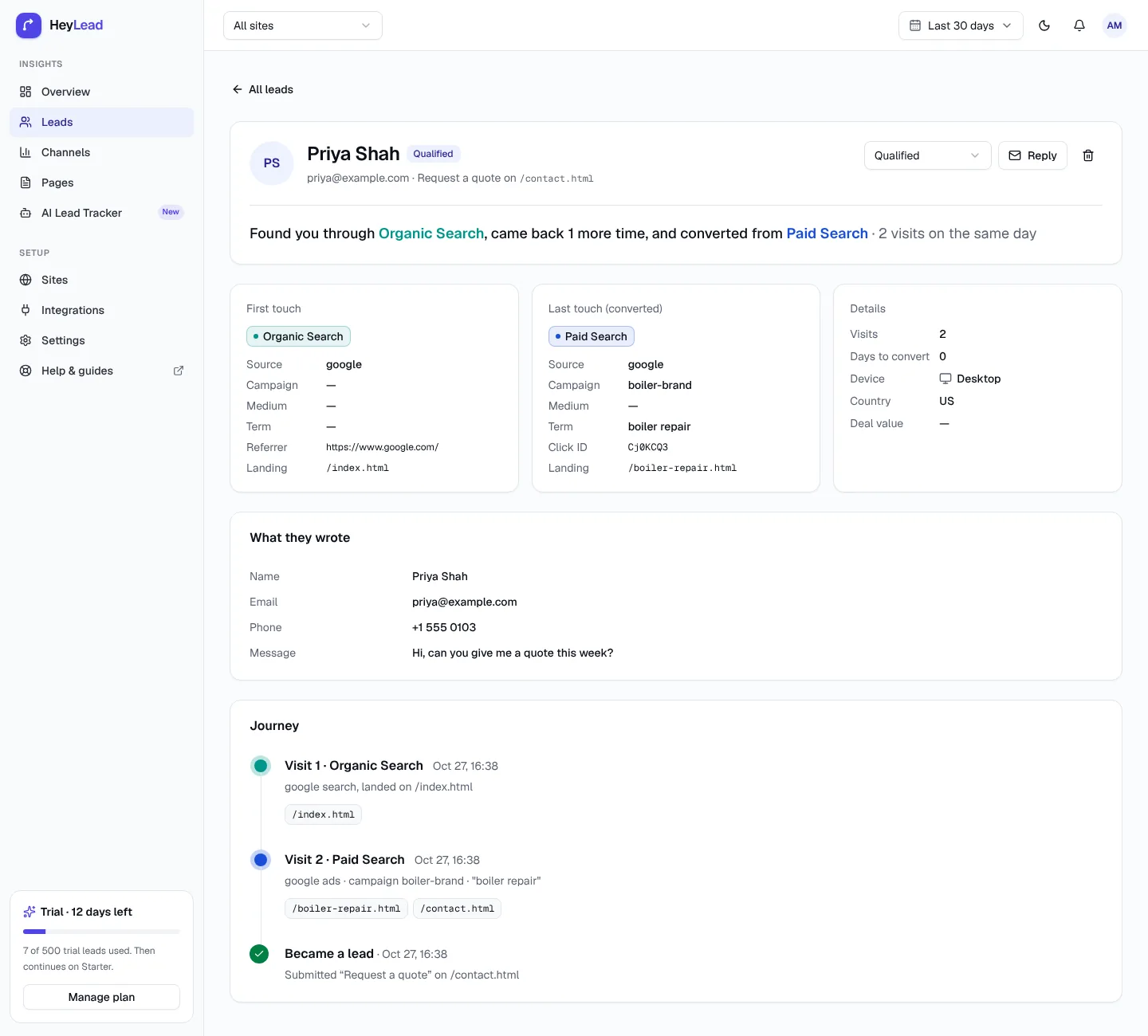
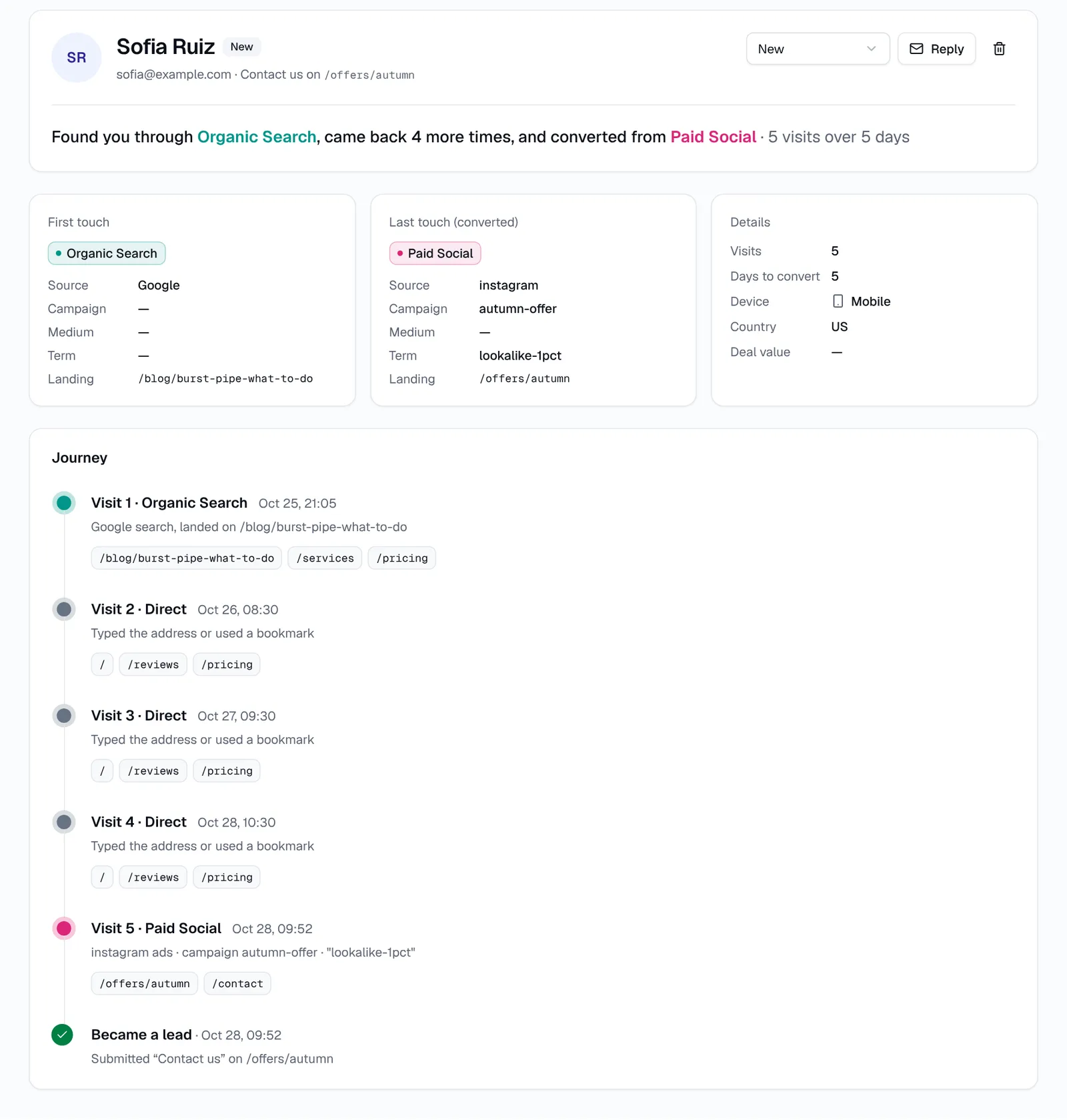
Lead source tracking records a small set of facts about the visit (or visits) that turned into a lead. A lead is anyone who contacts you with a form, booking request, quote request or similar enquiry. Most tools store the same core fields for each one:
| Field | What it means | Example |
|---|---|---|
| Channel | The broad type of traffic | Paid Search, Organic Social, AI Referral |
| Source | The specific site or platform that sent the visit | google, facebook, chatgpt.com, yelp.com |
| Medium | How the source delivered the visit, usually from a UTM tag | cpc, email, social, referral |
| Campaign | The campaign name you set in the ad platform or UTM tag | emergency-plumber, autumn-offer |
| Term | The keyword or audience, if the link carries one | boiler repair near me, lookalike-1pct |
| Landing page | The first page the person saw on your site in that visit | /emergency-plumbing |
| First touch | The visit that first brought the person to your site | Organic Search, a blog post, 3 weeks ago |
| Last touch | The visit when they sent the form | Paid Social, autumn-offer ad, today |
| Journey | Every visit in order between first and last touch | Organic → Direct → Email → Paid Social |
| Device and country | Where and on what they browsed | Mobile, US |
The journey matters more than most people expect. Someone might find you on Google, come back from an email a week later and only then fill in your form. If you only keep one of those visits, you only see part of the story.
Lead source vs channel vs campaign vs medium
Lead source, channel, campaign and medium are four different levels of detail, and mixing them up is the most common reason reports get messy. The table below gives a one-line definition of each.
| Term | Definition | Question it answers |
|---|---|---|
| Channel | A group of similar sources, such as Paid Search or Email | Which type of marketing works? |
| Source | The exact website or platform that sent the visit | Was it Google or Bing? Facebook or Instagram? |
| Medium | The delivery method, set in the utm_medium tag | Was the click paid, organic, email or a referral? |
| Campaign | A named push inside a source, set in the ad platform or utm_campaign | Which ad or promotion brought the lead? |
In everyday speech, “lead source” often means the whole bundle. In a report, keep them apart. Channel tells you where to spend; campaign tells you which ad or offer to keep. For a deeper look at how channels are defined, see how channels are explained in HeyLead.
Why isn't “How did you hear about us?” enough?
“How did you hear about us?” is not enough because self-reported answers depend on memory, and memory is poor at telling marketing channels apart. People forget, pick the first option in a dropdown, or say “Google” when they clicked an ad, saw your Maps listing or read an AI answer that mentioned you.
Here is how the same customer journey can produce a misleading answer:
- A homeowner asks ChatGPT for a local plumber, sees your name, then searches your business on Google and clicks your ad. On the form they pick “Google”. You credit organic search, pay for a branded ad click, and never learn ChatGPT started it.
- A prospect reads your blog post from organic search, then signs up weeks later after a Facebook ad. They answer “Facebook”, and your blog gets no credit.
- A visitor is in a hurry and leaves the dropdown on its default value, which happens to be the first option.
Self-reported source still has a place. It captures word of mouth, radio, trucks and yard signs that no tracker can see. Keep the question if you like it, and let automatic tracking record what actually happened online. When the two disagree, that disagreement is itself useful information.
How does lead source tracking work?
Lead source tracking works by reading the visit details your website already receives and attaching them to the form submission. A small script on your site reads the signals on each visit, classifies the visit into a channel, remembers it for that visitor and saves it with the lead when they send a form. Each signal is explained below.
UTM tags
A UTM tag is a label you add to the end of a link, such as ?utm_source=newsletter&utm_medium=email&utm_campaign=spring-sale, so the tracker knows exactly where the click came from. UTM tags are the most reliable signal because you write them yourself. They work on emails, social posts, QR codes, directory listings and ads.
The catch is consistency: Facebook, facebook and fb become three different sources. Use the free UTM builder and agree on a UTM naming convention before you tag anything.
Ad click IDs
An ad click ID is a code an ad platform adds to the link automatically when someone clicks an ad, so the platform can match the click to a conversion. Google Ads adds gclid (or gbraid / wbraid on some iOS traffic), Microsoft Ads adds msclkid, TikTok adds ttclid and LinkedIn adds li_fat_id. A tracker that recognises these can label the visit as paid even if you forgot to add UTM tags.
Facebook's fbclid is a special case. Facebook adds it to links from ads and from ordinary posts, so fbclid on its own cannot prove the click was paid. Add UTM tags to your Meta ads to separate paid from organic; our guide on tracking Facebook ads leads shows the exact URL parameters.
The referrer
The referrer is the address of the page a visitor was on before they clicked through to your site, which the browser passes along. A referrer of google.com with no ad click ID usually means organic search; chatgpt.com or perplexity.ai means an AI assistant; a partner's website means a referral.
Referrers are not always present. Some apps open links in an in-app browser that strips them, and typed or bookmarked visits have none. Those visits end up as Direct, the bucket for visits with no detectable source. If too many of your leads say Direct, read why your CRM says Direct.
First-party storage
First-party storage is a cookie or browser storage entry set by your own website, which lets the tracker remember a visitor's earlier visits. Without it, a person who first arrives from Google and returns three days later by typing your address would look like a brand-new Direct visitor. With it, the tracker knows the second visit belongs to the same person.
Form capture
Form capture is the step that joins the visit data to the lead. When the visitor submits a contact, quote or booking form, the tracker saves the person's details with their first touch, last touch and journey. Older setups do this with hidden form fields; newer tools detect forms on the page and capture submissions automatically. See how form capture works for the detail.
What about privacy and cookies?
Lead source tracking is a form of analytics, so treat it the way you treat Google Analytics. Mention it in your privacy policy, include it in your cookie banner if you serve visitors where consent is required (such as the EU and UK), and only collect what you need to run the business.
- Prefer tools that use first-party storage on your own domain rather than third-party cookies
- Collect form details the person chose to give you, not data scraped from elsewhere
- Keep a clear way for people to ask for their data to be deleted
- Check with a professional if you work in a regulated field such as health or legal
Our privacy and cookies guide lists exactly what HeyLead stores and how to describe it in your policy.
What is the difference between first touch, last touch and the full journey?
First touch, last touch and the full journey are three ways of answering “where did this lead come from?” when a person visited more than once. First touch is the visit that first brought someone to your site. Last touch is the visit when they sent the form. The full journey is every visit in between, in order.
Each view answers a different business question. First touch shows which channels introduce new people to you, which matters for growth. Last touch shows which channels close, which matters for short-term budget. The journey shows how they work together, for example a blog post that starts conversations and a retargeting ad that finishes them.
Many CRMs and ad platforms default to last touch, which tends to over-credit branded search and retargeting and under-credit the content that found the person in the first place. You don't have to pick one model forever. Look at both, and pay attention when they disagree. Our guide to first touch vs last touch walks through examples.
How is lead source tracking different from Google Analytics and CRM source fields?
Lead source tracking ties a source to each named lead, while Google Analytics (GA4) counts sessions and conversions in aggregate and a CRM source field stores whatever value someone or something typed into it. GA4 can tell you Paid Search drove 30 form submissions. A lead source tracker shows each of those 30 people, which ad or page brought them, and which ones became customers.
| Question | Google Analytics (GA4) | CRM source field | Lead source tracker |
|---|---|---|---|
| Shows source per named lead | No, GA4 does not store names or emails | Yes, if the field is filled in | Yes, automatically |
| Keeps first touch and last touch | Partly, through attribution reports | Usually one value only | Yes, plus the full journey |
| Fills itself in | Yes, for traffic | Only with hidden fields or an integration | Yes, on every captured form |
| Counts customers and revenue by channel | Only with extra setup | Yes, if source data is accurate | Yes, when you mark leads as customers |
| Best at | Site-wide traffic, content and behaviour | Managing the sales pipeline | Answering “where did this lead come from?” |
The three tools work best together. GA4 explains how people use your site, the CRM runs your follow-up, and the lead source tracker supplies the per-lead source that both are missing. The HeyLead vs Google Analytics comparison covers where GA4 is the better choice.
Which lead sources should you track for your type of business?
The lead sources you should track are every channel you spend money or time on, kept separate enough to make a decision about each. The exact list depends on how your customers find you. Here are starting points for four common business types.
Local service businesses
Plumbers, electricians, cleaners, clinics and law firms usually win leads from search and maps. Track these separately:
- Google Ads and Microsoft Ads, split by campaign (emergency vs routine work)
- Your Google Business Profile, tagged so it doesn't blend into organic search; see tracking Google Business Profile leads
- Organic search from Google and Bing
- Directories such as Yelp, Angi or legal directories
- AI assistants such as ChatGPT and Perplexity, which increasingly answer “who's a good plumber near me?”
Industry guides go further for law firms and real estate agents, and the local services solution page shows a typical setup.
Agencies
Agencies need lead sources for two reasons: their own new business and proof of results for clients. Track paid search, paid social and email for each client by campaign, and keep naming identical across accounts so reports compare like with like. See agency client reporting and the agencies solution page.
B2B and software companies
B2B buyers research for weeks, so first touch and the full journey matter more than last touch. Track LinkedIn ads, Google Ads, organic search on comparison and how-to content, webinars, partner referrals and AI assistants. Demo requests and trial sign-ups are your leads. The SaaS solution page covers longer journeys.
Ecommerce stores
Ecommerce stores often track sales in their store platform, but leads still matter: wholesale enquiries, custom orders, quote requests and newsletter sign-ups. Track Meta and TikTok ads by campaign, Google Shopping, email flows, influencer codes with their own UTM tags and affiliates. The ecommerce solution page has more.
How do you set up lead source tracking?
You set up lead source tracking either manually, with spreadsheets, hidden fields and dedicated phone numbers, or automatically, with a script that captures every form. Many small businesses start manually and move to automatic once the spreadsheet gets painful. Here is what each method involves.
Manual methods
- A spreadsheet: you or your team log every enquiry with a source column. It costs nothing, but it relies on someone asking and remembering, and it inherits all the problems of self-reported answers.
- Hidden form fields: invisible fields in each form that copy UTM values from the page address into the submission, so the source lands in your inbox or CRM. They work, but each form needs setup, the values are often lost when a visitor clicks to a second page, and a new form added next year won't have them. See our hidden fields guide.
- Call tracking numbers: a separate phone number per channel (one on your Google Ads, another on your truck) so calls can be counted by source. Useful if most of your leads phone you, and usually needs a dedicated call tracking service.
Automatic tracking
Automatic tracking uses a script on every page that reads UTM tags, click IDs and referrers, remembers earlier visits and attaches all of it to each form submission. You install it once. New forms are picked up without changes, and the source survives even if the visitor browses several pages first.
A 30-day starter plan
A 30-day starter plan gives you enough data to make one good decision without changing everything at once. Follow these steps in order:
- Day 1: List every channel you pay for and every place you post. Write down roughly what you spend on each per month.
- Day 1: Agree on lowercase UTM names (for example
facebook,instagram,newsletter) and write them in a shared note. - Day 2: Install your tracker on every page that has a form. In HeyLead, follow installing the tracking script.
- Day 2: Send yourself a test lead from a tagged link and check the source, campaign and landing page are right.
- Days 3–5: Add UTM tags to links you control: email newsletters, social bios, Google Business Profile website link and directory listings. Our UTM tagging guide shows where to put them.
- Days 3–5: Make sure your Google Ads account has auto-tagging on and your Meta ads use URL parameters with
utm_medium=paid_social. - Week 2: Mark each lead's status as it moves on (qualified, customer, lost) and add a deal value when you win.
- Week 3: Look at the Direct share. If it is high, check for untagged links and pages without the script.
- Day 30: Compare leads, customers and revenue by channel, then make one budget change. Repeat monthly.
How do you read your lead source numbers?
You read lead source numbers by moving from leads to customers to revenue for each channel, then dividing your spend by customers rather than by leads. A channel that sends lots of leads can still be your worst channel if none of them buy. Cost per customer, not cost per lead, is the number that should drive budget.
Here is a worked example for a fictional two-van plumbing company after one month. All figures are invented for the arithmetic.
| Channel | Spend | Leads | Customers | Revenue | Cost per lead | Cost per customer |
|---|---|---|---|---|---|---|
| Google Ads | $1,500 | 30 | 5 | $4,000 | $50 | $300 |
| Facebook ads | $600 | 24 | 2 | $900 | $25 | $300 |
| Directory listing | $400 | 8 | 4 | $2,400 | $50 | $100 |
| Google Business Profile | $0 | 12 | 6 | $3,000 | $0 | $0 |
Looking only at cost per lead, Facebook ads look like the winner at $25. Looking at cost per customer, Facebook ads and Google Ads tie at $300, and the directory listing wins clearly at $100. Google Business Profile costs nothing in ad spend and brings half of its leads to a sale, so the time spent on photos and reviews there is well used.
A sensible move for this business would be to keep Google Ads, test a bigger directory package, and check the Facebook campaign's landing page and offer before cutting it. One month is a small sample, so make one change at a time and compare again next month.
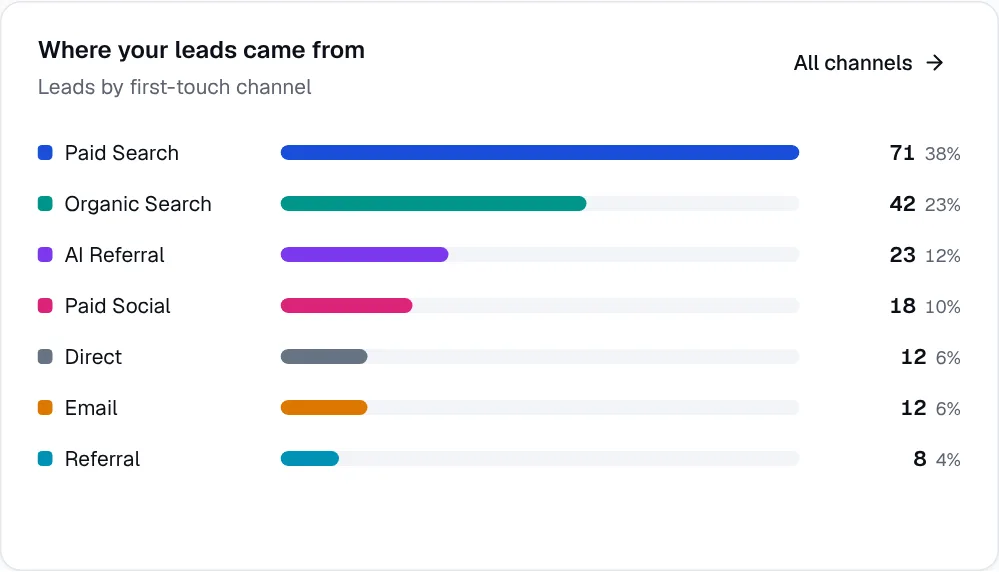
- Leads by channel shows where enquiries come from.
- Conversion rate (customers ÷ leads) shows lead quality.
- Cost per customer (spend ÷ customers) shows value for money.
- Revenue by channel shows which channels bring the bigger jobs.
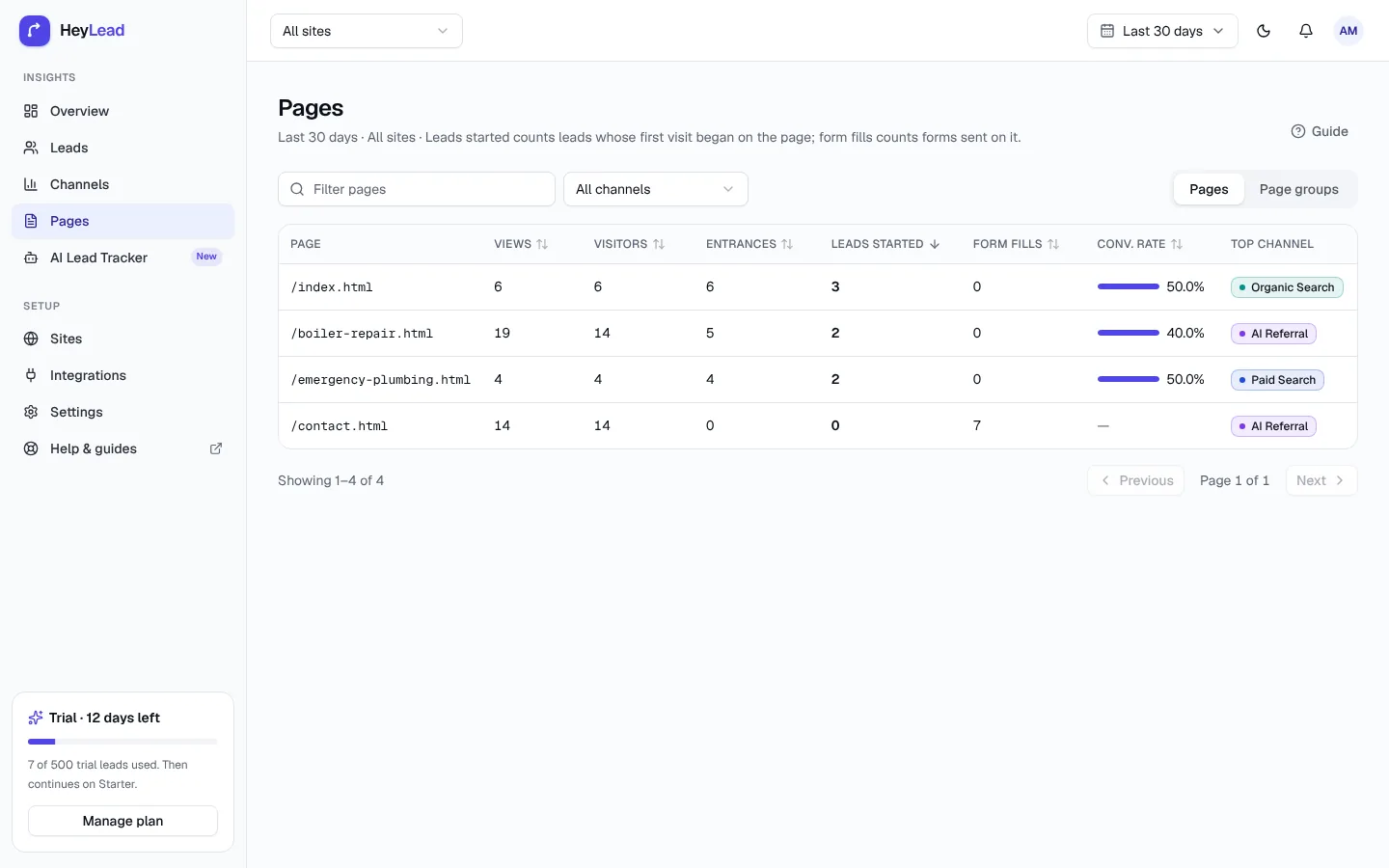
- Leads by landing page shows which pages turn visitors into enquiries.
If you use HeyLead, reading your dashboard explains where each of these numbers lives.
Common mistakes with lead source tracking
- Judging channels on leads alone. Cheap leads that never buy are expensive. Always look at customers and revenue.
- Inconsistent UTM names.
Facebook,facebookandFBsplit one source into three rows. Pick lowercase names and stick to them. - Tagging internal links. UTM tags on links between your own pages overwrite the real source. Only tag links that point to your site from somewhere else.
- Leaving Meta ads untagged. Without UTM tags, Facebook and Instagram ad clicks can't be told apart from organic posts.
- Missing pages. A tracker only sees pages it is installed on. Landing pages built in a separate tool need the script too.
- Ignoring Direct. A large Direct share usually means untagged links, stripped referrers or AI assistants going unrecognised, not people typing your address.
- Never updating lead status. If you don't mark customers, you can't count customers by channel.
- Changing everything at once. Change one budget at a time so you can see what caused the result.
Key takeaways
- Lead source tracking records the channel, source, campaign and landing page behind each lead, plus the journey of visits before it.
- Automatic tracking reads UTM tags, ad click IDs and referrers, so it is more reliable than asking “How did you hear about us?”
- Per-lead tracking lets you count customers and revenue by channel, which GA4 alone doesn't do.
- Judge channels on cost per customer, not cost per lead.
- Setup can be no-code: one script, automatic form capture, consistent UTM tags and a test lead.
Further reading: no-code lead tracking, Facebook ads leads, Google Business Profile leads, leads from ChatGPT, law firm lead tracking and real estate lead tracking.
Frequently asked questions
What is a lead source?
A lead source is the place an enquiry came from, such as a Google ad, a Facebook post, your Maps listing, a directory or an AI assistant like ChatGPT.
Is lead source tracking the same as marketing attribution?
Lead source tracking is the foundation of attribution. It records where each lead came from; attribution decides how to credit channels when a lead touched several of them.
Do I need a CRM to track lead sources?
No. A lead source tracker can store leads and their sources in its own dashboard. If you use a CRM such as HubSpot, you can send the source there too.
Does lead source tracking need cookies?
Most trackers use a first-party cookie or local storage to remember a visitor between visits. Check that your cookie banner and privacy policy cover it, as you would for analytics.
Can I track lead sources without hidden fields?
Yes. Automatic trackers capture form submissions directly on the page, so you don't need hidden fields. Hidden fields are still useful if you want the source to travel into a CRM through your form tool.
Why do so many of my leads show as Direct?
Direct usually means the visit had no UTM tag, no ad click ID and no referrer. Untagged email and social links, in-app browsers and unrecognised AI assistants are the usual causes.
Can lead source tracking see phone calls?
Only if you use call tracking, which gives each channel its own phone number. Form-based lead source trackers record forms and bookings, not calls.
How long before lead source data is useful?
Give it about 30 days for most small businesses, long enough to see leads turn into customers. Businesses with long sales cycles should wait for a full cycle before cutting a channel.