Quick answer
- A law firm sees which marketing brings new clients by recording the source of every consultation request and marking which requests became retained clients.
- Each lead source needs its own tracking method: click IDs for Google Ads, UTM tags for directory and Google Business Profile links, and intake questions for phone calls and referrals.
- Compare channels by cost per retained client and fees earned, not by clicks, calls or raw enquiries.
- Report by practice area and landing page as well as channel, because one practice-area page often brings most of the retained clients.
- A one-page monthly review of enquiries, retained clients, fees and cost per client gives the managing partner one clear budget decision each month.
A law firm can see which marketing brings new clients by tracking the source of every consultation request on its website, then marking which of those enquiries became retained clients. Compare retained clients and fees by channel, not clicks or calls, and you know which Google Ads campaigns, directories and practice-area pages are worth the money.
This playbook walks through every lead source a typical firm has, how to track each one, how to set up your consultation form and intake statuses, and how to work out cost per retained client. It ends with a monthly review a managing partner can run in 20 minutes.
Why does lead tracking matter so much for law firms?
Lead tracking matters for law firms because legal advertising is expensive and the path from first click to signed engagement letter is long. Practice-area keywords such as personal injury, divorce or criminal defence are among the most competitive in Google Ads, so every wasted click costs real money.
Lead source tracking means recording which channel, campaign and web page brought each enquiry, so you can follow it through to the outcome. For a law firm, the outcome that matters is a retained client, not a form fill.
Three things make legal harder to measure than most local businesses:
- Long intake. A prospective client may read your practice-area pages several times over weeks, compare firms, then book a consultation. The visit that converts is rarely the visit that found you.
- Many enquiries are not cases. Requests outside your practice area, outside your jurisdiction or without a viable claim are common, and the share differs sharply by channel.
- Offline steps. Phone calls, referrals from other attorneys and walk-ins all start outside your website, so a website tracker alone cannot see them.
Without tracking, the loudest channel wins the budget argument. With tracking, the channel that brings signed clients at a sensible cost wins. If you are new to the idea, start with what lead source tracking is.
Where do law firm leads come from, and how do you track each one?
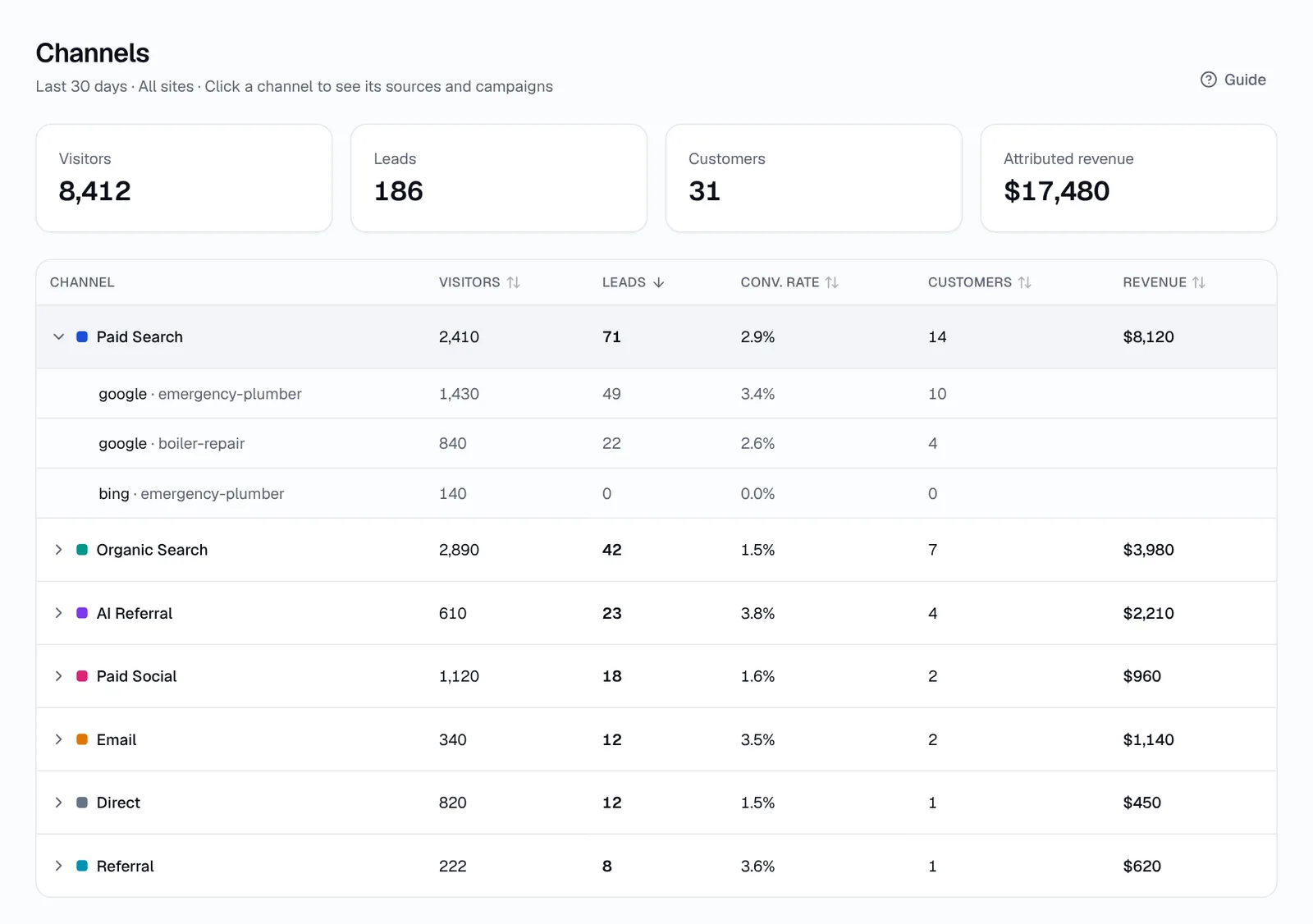
Law firm leads usually come from eight or nine channels, and each one needs a slightly different tracking method. A channel is the broad type of traffic, such as Paid Search or Referral; the source is the specific site, such as google or avvo.com.
| Lead source | How to track it | Where it shows up |
|---|---|---|
| Google Ads (search) | Keep auto-tagging on in Google Ads so every click carries a gclid click ID; add UTM tags for campaign names you can read | Paid Search, source google, with campaign and keyword |
| Google Local Services Ads | Most LSA leads call or message you inside Google, so track them in the LSA dashboard and log them in intake; any clicks to your site arrive from Google | Mainly outside your website; record as a separate line in your monthly review |
| Google Business Profile | Add UTM tags to the website link, e.g. ?utm_source=gbp&utm_medium=organic&utm_campaign=listing | Organic Search with source gbp, or its own channel via a custom rule |
| Avvo, Justia, FindLaw, Martindale, Lawyers.com | Visits arrive with the directory as referrer; if the profile lets you edit the website URL, tag it with utm_source=avvo&utm_medium=referral and so on | Referral, source avvo.com, justia.com etc., or a Legal directories channel via custom rules |
| Organic search and practice-area pages | No tagging needed; the referrer and landing page tell you which page someone found | Organic Search, with the landing page |
| AI assistants (ChatGPT, Perplexity, Gemini, Copilot, Claude) | Recognised by referrer, and ChatGPT adds utm_source=chatgpt.com to many links | AI Referral, with the assistant's name |
| Social (Facebook, Instagram, LinkedIn) | Tag paid campaigns with utm_medium=paid_social; tag organic posts with utm_medium=social | Paid Social or Organic Social |
| Referrals from attorneys and past clients | Ask "How did you hear about us?" at intake and record the referrer's name; if they send a link, it arrives as Direct | Intake notes, plus Direct or Referral on the website |
| Email newsletters | Tag every link with utm_medium=email and a campaign name | Email, with the campaign |
A UTM tag is a short label added to the end of a link, such as utm_source=avvo, that tells analytics tools where the click came from. A click ID is a code an ad platform adds automatically, such as Google's gclid. Build tagged links with the free UTM builder and follow one UTM naming convention across the firm so reports stay clean.
What about phone calls?
Phone calls are a large share of legal enquiries, and a website form tracker does not see them. HeyLead does not track phone calls today (call tracking is on the roadmap). Until you add a call tracking tool, ask every caller how they found you and record the answer in your intake system, using the same channel names as your web reports.
How do you track consultation requests from your website form?
You track consultation requests by installing a lead tracker on your website that records the channel, campaign and landing page behind each form submission. The consultation request form is the most trackable conversion a firm has, so make it the centre of your measurement.
- Install a tracking script on every page of the site, or use a plugin if you run WordPress. See how to install the tracking script.
- Check your forms are detected. Submit a test enquiry on each form: consultation request, contact page and any practice-area form.
- Tag the links you control: Google Business Profile, each directory profile, email newsletters and social campaigns.
- Turn on new-lead notifications so intake staff see the source as soon as a request arrives.
- Connect your CRM or intake tool if you use one, so the source travels with the contact. Options include HubSpot, Zapier and webhooks.
- Run a test from each channel: click your own Google Business Profile link and a directory link, submit the form, and confirm the right channel appears.
First touch is the channel that brought someone to your site the first time; last touch is the channel of the visit where they submitted the form. For a law firm, first touch often shows the page that built trust, such as a guide to how divorce works in your state, while last touch shows the ad or listing that prompted the call to action. Read more on first touch vs last touch.
Keep the form short and the details for later
Keep the web form to name, phone, email, practice area and a short note about the matter. Ask for confidential case details later, after your conflict check, through your practice management system or a secure intake process.
A short form helps in two ways. Fewer prospective clients abandon it, and you avoid collecting sensitive facts before you know you can act for the person. Add a line near the form saying that submitting it does not create an attorney-client relationship, worded as your firm prefers.
How should a law firm's intake statuses map to lead tracking?
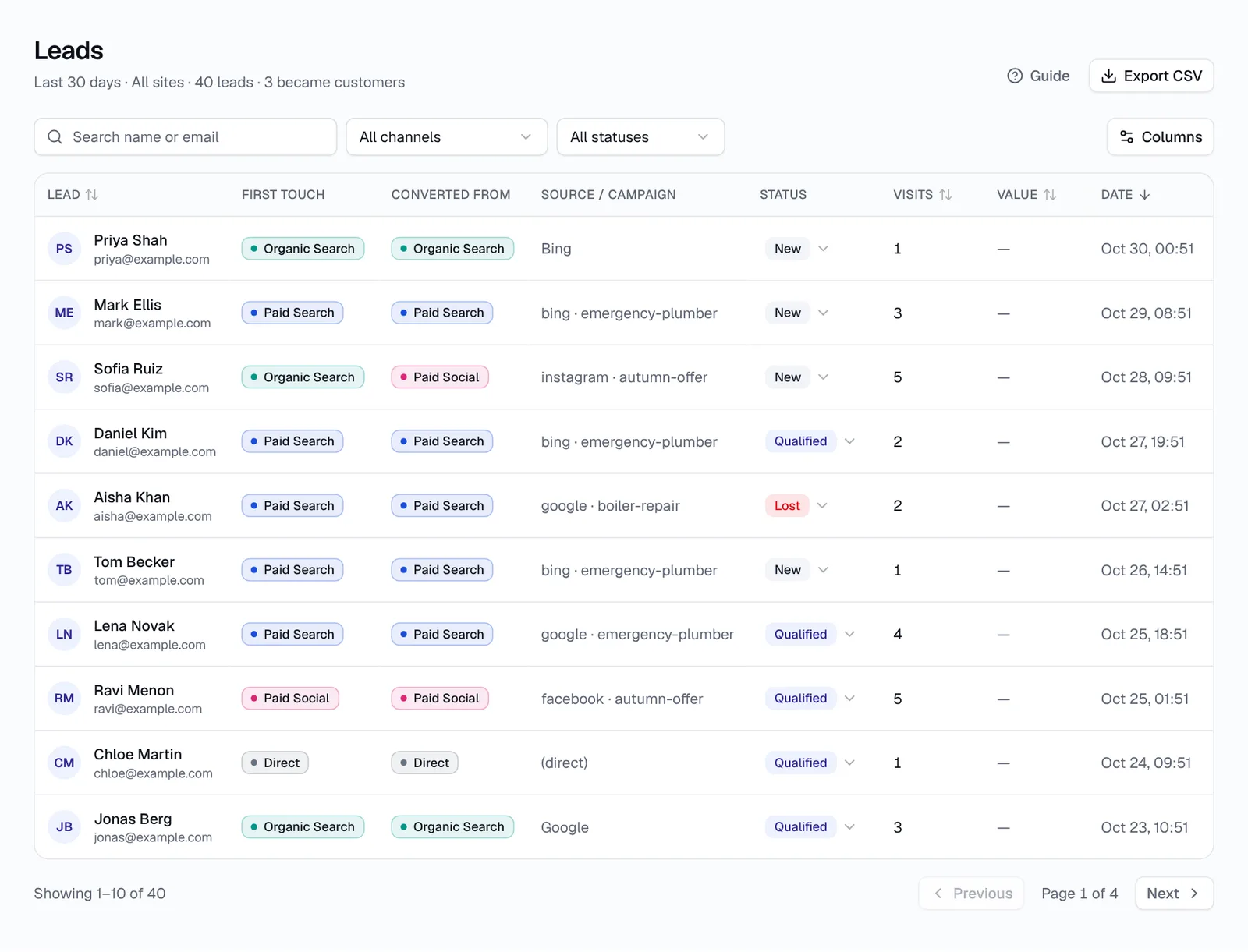
A law firm's intake statuses should map to four simple lead statuses: New, Qualified, Customer and Lost. Keeping the list short means intake staff actually update it, and four statuses are enough to calculate qualification rate, retain rate and cost per retained client by channel.
| Intake stage at the firm | HeyLead status | When to set it |
|---|---|---|
| Consultation request received, not yet reviewed | New | Automatically, when the form is submitted |
| Right practice area and jurisdiction, conflict check clear, consultation booked | Qualified | After the first intake call or conflict check |
| Engagement letter signed, retainer paid | Customer | When the client is retained; add the expected fee as the deal value |
| Wrong practice area, out of jurisdiction, conflict, not viable, chose another firm or no response | Lost | As soon as you know; note the reason in your intake system |
Agree one rule for deal value and stick to it. For hourly or flat-fee matters, use the flat fee or the initial retainer. For contingency matters, many firms use an estimated fee and update it when the case resolves. What matters is that every channel is measured the same way.
How do you measure cost per retained client by channel?
You measure cost per retained client by dividing each channel's monthly spend by the number of clients that channel brought who signed an engagement letter. Cost per retained client is the number that tells a managing partner whether a channel pays for itself, because it accounts for enquiries that never became cases.
Here is a worked example for a fictional three-attorney family law firm. The numbers are invented to show the arithmetic, not benchmarks.
| Channel | Monthly cost | Enquiries | Retained clients | Cost per retained client | Fees from retained clients |
|---|---|---|---|---|---|
| Google Ads | $6,000 | 40 | 6 | $1,000 | $30,000 |
| Legal directory profile | $1,500 | 30 | 2 | $750 | $7,000 |
| Organic search (SEO retainer) | $2,000 | 20 | 4 | $500 | $22,000 |
| Attorney referrals | $0 | 6 | 3 | $0 | $18,000 |
Read the table row by row. Google Ads brought the most enquiries and a solid number of clients: $6,000 divided by 6 clients is $1,000 per client, against $30,000 in fees. The directory brought 30 enquiries but only 2 clients, so its retain rate is about 7%, compared with 15% for Google Ads.
The directory still looks cheap per client at $750, but its fees are lower, because the matters it sends are smaller. Organic search is the strongest channel in this example, and attorney referrals cost nothing but cannot be scaled by spending more. A sensible next step would be to keep Google Ads, invest more in practice-area content and review the directory listing.
How to read the numbers
- Retain rate = retained clients ÷ enquiries. A low retain rate points to the wrong audience, the wrong practice area or a weak intake process.
- Cost per enquiry = spend ÷ enquiries. Useful for spotting cost spikes, but never use it alone to judge a channel.
- Fees per retained client = fees ÷ retained clients. Two channels with the same cost per client can bring very different case values.
- Return on spend = fees ÷ spend. In the example, Google Ads returns $5 in fees for every $1 spent.
Give each channel at least two or three months before you judge it. Legal matters take time to qualify and sign, so a single month can swing a lot, especially for smaller practice areas.
Which practice areas and landing pages bring the best cases?
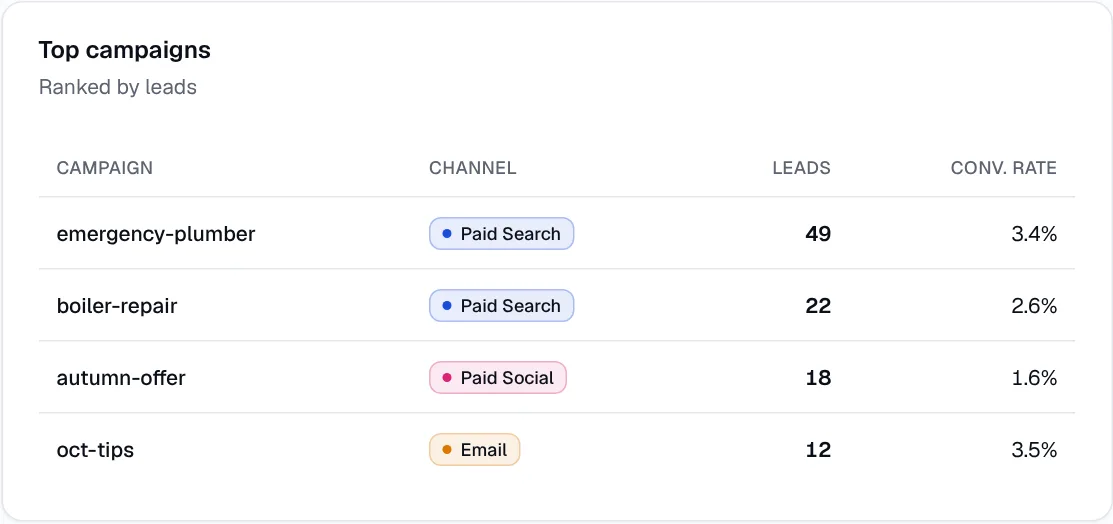
The practice areas and landing pages that bring the best cases are usually a small number of specific pages, not the homepage. A firm that handles both family law and personal injury often finds that one or two practice-area pages bring most retained clients, while the homepage brings general questions and wrong-fit enquiries.
A landing page is the first page someone sees on your site in a visit. Reporting by landing page tells you which pages convert, and which practice areas your marketing actually feeds.
- Give each practice area its own page, such as divorce, child custody, DUI defence or car accident claims, and avoid sending ads to the homepage.
- Point each Google Ads ad group at the matching practice-area page, so the report shows cost and clients by practice area.
- Compare form fill rates by page. A page with lots of visitors and few enquiries usually needs a clearer next step, a shorter form or more plain-English answers.
- Split reports by practice area every month: enquiries, retained clients and fees. Budget should follow the practice areas the partners want to grow.
If you serve several cities or offices, give each its own location page as well. The same report then tells you which locations bring clients and which only bring traffic. Our guide for local service businesses covers location pages in more detail.
How do AI assistants recommend lawyers, and how can your pages get quoted?
AI assistants recommend lawyers by searching the web, reading pages that answer the question clearly, and linking to the firms and pages they quote. People now ask ChatGPT, Perplexity, Gemini, Copilot or Claude questions like "How does divorce work in my state?" or "Who handles car accident claims near me?" before they search.
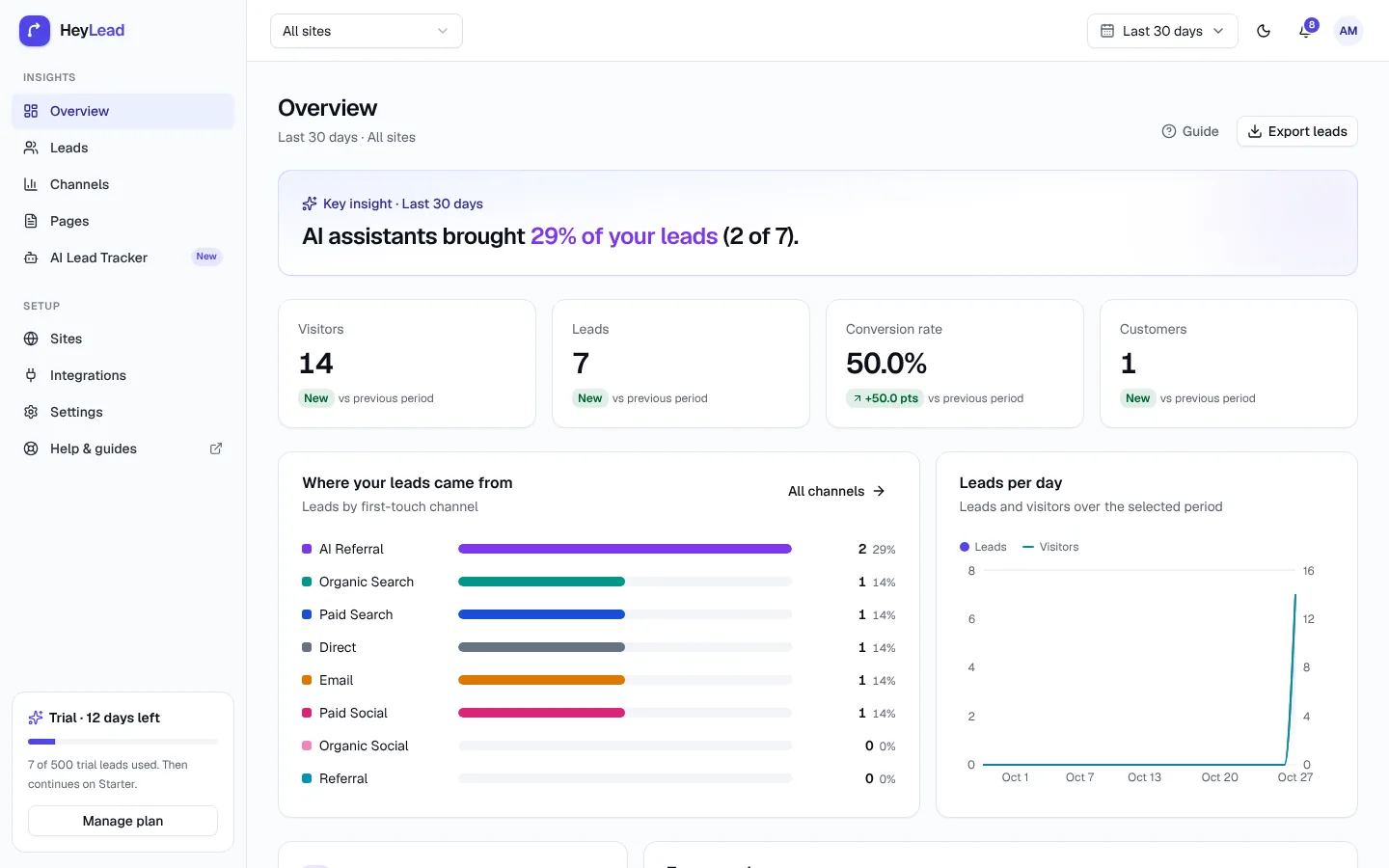
When someone clicks a link inside an assistant's answer, the visit often reaches your site with the assistant as referrer. Many analytics tools still count these as Direct; a tracker that recognises AI referrers shows them as their own channel. See how to track leads from ChatGPT for the details.
To make practice-area pages easy for AI assistants to quote:
- Answer the main question first in the opening paragraph: what the process is, how long it usually takes, and who it applies to.
- State plain facts: which practice areas you handle, which courts and counties you cover, office locations, languages spoken and how fees work.
- Use question headings that match how people ask, such as "How long does an uncontested divorce take?"
- Add a short FAQ with direct one- to three-sentence answers.
- Keep each page current, with a visible updated date, and remove outdated law or fee information.
- Be consistent about your firm's name, address and practice areas across your site, Google Business Profile and directories.
Then check the data. The landing pages that AI referrals arrive on are the pages assistants trust. Keep those pages the most accurate on your site, and use them as templates for the practice areas that get no AI traffic yet.
How should a managing partner review marketing results each month?
A managing partner should review marketing results monthly using one page: enquiries, retained clients, fees and cost per retained client by channel and practice area. The review should end with one budget decision, so the data changes what the firm does next month.
What report to ask your legal marketing agency for
If an agency runs your Google Ads, SEO or directory listings, ask for a report that goes past clicks and impressions to the outcomes your firm cares about. The agency can only report retained clients if your intake team updates lead statuses, so agree that process together.
| Metric | What it tells you | Ask for it by |
|---|---|---|
| Consultation requests | How many real enquiries the work produced | Channel, campaign and practice area |
| Qualified enquiries | How many were the right kind of matter in your area | Channel and practice area |
| Retained clients | How many signed an engagement letter | Channel, campaign and landing page |
| Cost per retained client | Whether each channel pays for itself | Channel and campaign |
| Fees from retained clients | The value the marketing brought in | Channel and practice area |
Give the agency access to the same lead data you see, rather than relying on screenshots from each ad platform. Ad platforms each count their own conversions, so their totals overlap; one lead list with one source per lead does not. Agencies can learn more on our agency solutions page.
The 20-minute monthly review
- Consultation requests by channel, compared with last month
- Retained clients and fees by channel and practice area
- Cost per retained client for Google Ads, Local Services Ads and each directory
- Top three landing pages by retained clients, and one page to improve
- AI referrals: which assistants sent leads and which pages they landed on
- Leads still on New or Qualified for more than 30 days, to chase or close
- One budget change for next month, written down with the reason
Your first 30 days
- Week 1: install tracking, test every form, and tag your Google Business Profile, directory and email links.
- Week 2: agree the four statuses and the deal value rule with intake staff, and add "How did you hear about us?" to phone intake.
- Week 3: create custom channel rules if you want directories or your profile as their own lines, and check that ads land on practice-area pages.
- Week 4: run your first monthly review, even with partial data, and write down what you will compare next month.
A custom channel rule tells your tracker to put matching visits into a channel you name, for example "if referrer contains avvo.com, call it Legal directories". See custom channel rules for how they work in HeyLead.
Common mistakes law firms make with lead tracking
- Judging channels by enquiries. A directory with many wrong-fit enquiries can look better than a campaign that brings fewer, larger cases.
- Never updating statuses. Without Customer and Lost marked, you cannot calculate retain rate or cost per retained client.
- Sending every ad to the homepage. You lose practice-area reporting and usually convert fewer visitors.
- Leaving directory and profile links untagged, then wondering why Google Business Profile leads disappear into organic search.
- Ignoring phone calls and referrals. If intake does not record the source of calls, a large share of clients has no channel at all.
- Collecting case details on the web form. Long forms put people off, and confidential facts belong after your conflict check.
- Trusting each ad platform's own conversion count. Platforms overlap and each tends to claim credit, so totals add up to more leads than you got.
- Turning off a channel after one bad month. Legal intake is slow; look at two or three months before cutting spend.
Key takeaways
- Track the source of every consultation request on your website, and record the source of every phone call and referral at intake.
- Use click IDs for Google Ads, UTM tags for directory, profile and email links, and treat Local Services Ads as a separate line.
- Map intake to four statuses (New, Qualified, Customer, Lost) and add the fee when a client is retained.
- Compare channels by cost per retained client and fees, and report by practice area and landing page.
- Write practice-area pages that answer questions plainly so AI assistants quote them, then track the AI referrals they send.
- Run a monthly review that ends with one budget decision.
Frequently asked questions
Can I track Google Local Services Ads leads on my website?
Mostly no. Local Services Ads leads usually call or message you through Google, so they appear in the Local Services Ads dashboard rather than as website visits. Log them in intake so they still appear in your monthly review.
How do I track leads from Avvo, Justia or FindLaw?
Visits from directory profiles arrive as referral traffic with the directory's domain as the source. For cleaner data, add UTM tags to the website link on each profile if the directory lets you edit it, and use a custom channel rule to group all directories together.
Should confidential case details go through my website form?
Keep the website form to contact details, practice area and a short summary. Collect confidential information after your conflict check, through your practice management system or a secure intake process.
What is a good cost per retained client for a law firm?
It depends on your practice area and average fee, so there is no single good number. Compare each channel's cost per retained client with the average fee for that type of matter, and keep channels where fees comfortably exceed cost.
How do I track phone calls from my law firm's marketing?
Phone calls need a call tracking tool or a consistent intake question such as "How did you hear about us?". HeyLead tracks website forms and does not track phone calls today, though call tracking is on its roadmap.
Do people really find lawyers through ChatGPT?
Yes, some people ask AI assistants such as ChatGPT and Perplexity to explain a legal process or suggest a firm, and click through to the pages cited. A tracker that recognises AI referrers shows how many leads your firm gets this way.
Does lead tracking change my bar advertising obligations?
No. Tracking measures which marketing brings clients; it does not change what your ads and pages may say. Check your state bar's advertising rules for any new campaign or landing page.