Quick answer
- Lead attribution software records which channel, campaign and page brought each lead, and credits that marketing when the lead becomes a customer.
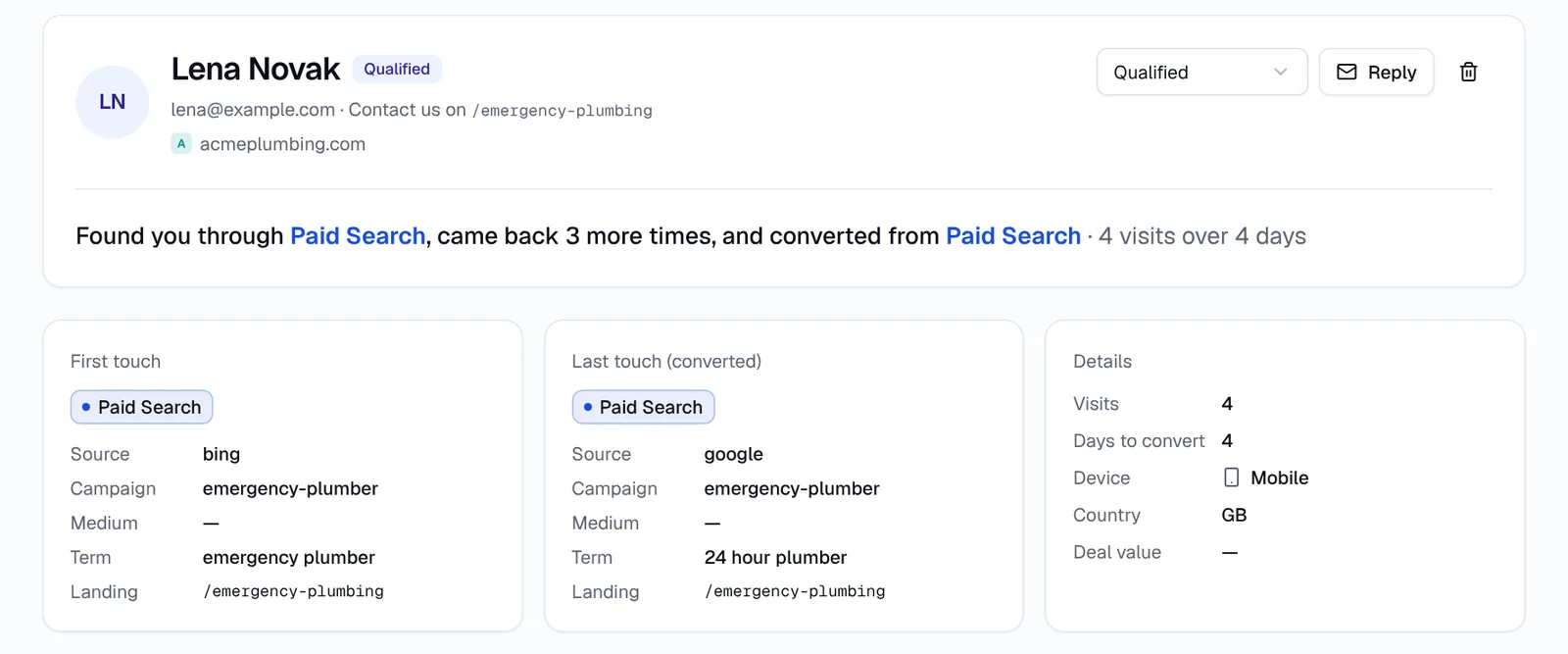
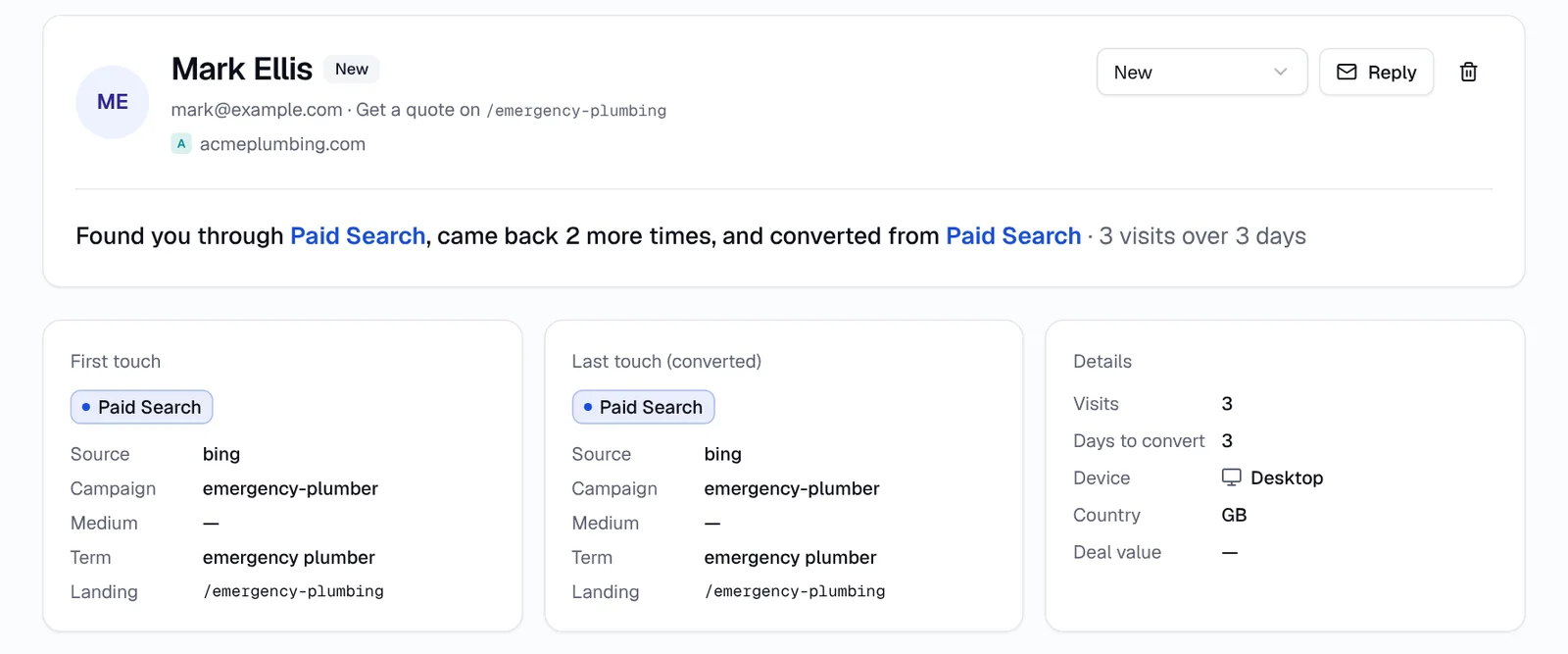
- It saves the source on every named lead, usually as a first touch, a last touch and the visits in between.
- Google Analytics counts anonymous visits, and a CRM's original source field often says Direct, while lead attribution software ties the full source to each person.
- Before you buy, check how leads reach you (forms, calls or chat), which CRM the tool must feed, and how its price grows.
- HeyLead captures website form leads automatically with first touch, last touch and the full journey, including leads from AI assistants, but doesn't track phone calls yet.
Lead attribution software records which channel, campaign and page brought each lead, and credits that marketing when the lead becomes a customer. It reads where each visitor came from, remembers it across visits and saves it with the form submission. You then see, lead by lead, which ads, posts and searches bring enquiries and which bring paying customers.
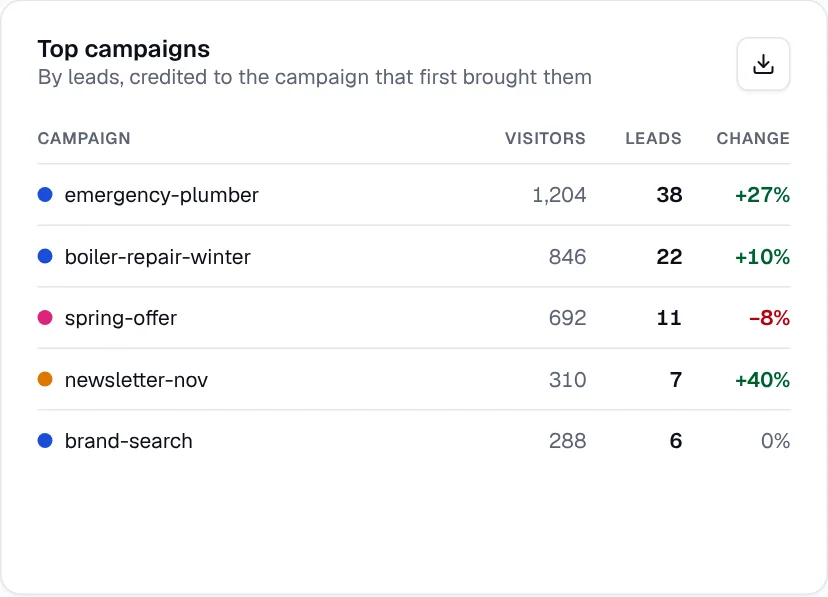
Most small businesses already have three sets of numbers that disagree. Google Ads and Facebook report conversions by their own rules. Google Analytics shows channels but no names. The CRM has the names, but its source field says Direct, Offline or nothing at all. Lead attribution software adds the missing piece: the marketing source on every named lead.
What is lead attribution software?
Lead attribution software is a tool that tracks where each lead came from and gives credit for that lead to the marketing that brought it. A lead is a person who has given you their details, usually through a form, a call or a chat. Attribution means deciding which channel or campaign earned the lead.
It does three jobs:
- Records the source: the channel, campaign and landing page of the visit that brought the person, and of later visits.
- Attaches it to the lead: the source is saved with the name and form answers, not in a separate report.
- Follows the outcome: when you mark a lead as a customer, with a deal value, the credit flows back to the marketing behind it.
A channel is a broad group of traffic, such as Paid Search, Email or Referral. A campaign is a named piece of marketing inside a channel, such as spring-offer. Tools sold as lead tracking software usually do the same jobs under a different name.
Lead attribution vs lead source tracking
Lead source tracking records where each lead came from, while lead attribution decides how much credit each source gets. The difference shows when a lead visited several times from different places.
Source tracking is the raw facts: "this lead first came from a Google ad, then returned from an email". Attribution is the judgement on those facts: "the Google ad gets the credit for finding them". Every attribution tool depends on good source tracking underneath. Our guide on what lead source tracking is covers the recording side, and our lead source tracking software page shows what HeyLead records.
Lead attribution vs marketing attribution
Lead attribution works person by person, while marketing attribution works channel by channel. In a made-up example, lead attribution tells you that Maria came from a Facebook ad and became a customer. Marketing attribution adds up every Maria and tells you how many customers Facebook ads brought last quarter.
Lead-level data is what makes channel reports trustworthy. If you can open any number and see the people behind it, you can check it against who actually called and paid. Our page on marketing attribution for small businesses covers the channel-level side.
How does it compare with Google Analytics and your CRM?
Lead attribution software differs from Google Analytics and a CRM's source field in what it ties the source to. Google Analytics ties it to anonymous sessions. A CRM ties it to a contact, but often as a vague label. Lead attribution software ties the full source to each named lead.
| Question | Lead attribution software | Google Analytics (GA4) | CRM "original source" field |
|---|---|---|---|
| Shows the source next to each named lead | Yes | No, visits and conversions are anonymous | Yes, but often only a broad label |
| Records campaign, keyword and landing page | Yes, per lead | Yes, in aggregate reports | Only if the form passes them in |
| Shows first touch and last touch | Usually both | Uses its own model for conversion credit | Usually one value |
| Follows the lead to a sale | Yes, when you mark outcomes | Only if you send sales data back | Yes, deals live in the CRM |
| Works with forms on any website builder | Usually, through a script or plugin | Needs conversion events set up | Only for forms connected to that CRM |
None of these is wrong; they answer different questions. Our Google Analytics comparison goes into more depth.
How does lead attribution software work?
Lead attribution software works by placing a small tracking script on your website that reads where every visitor came from, remembers it across visits and saves it with any form the visitor submits. When the visitor becomes a lead, that record becomes the lead's source.
The steps, in order:
- You add a script to your site: one script tag, or a plugin for builders such as WordPress.
- The script reads each visit: UTM tags and ad click IDs in the address, and the page the visitor came from.
- It sorts the visit into a channel: Paid Search, Email, AI Referral and so on, using fixed rules.
- It remembers the visitor: a visit days later joins the same visitor's history.
- It attaches the history to the lead: the form submission is saved with its first touch, last touch and visits in between.
- It sends the lead on: to your CRM, a spreadsheet or an email alert.
- You mark the outcome: Qualified, Customer or Lost, ideally with a deal value.
Where does the source data come from?
The source data comes from clues that arrive with every visit: UTM tags, ad click IDs, the referrer and AI assistant signals. A good tool checks them in a fixed order, so the same visit always gets the same channel.
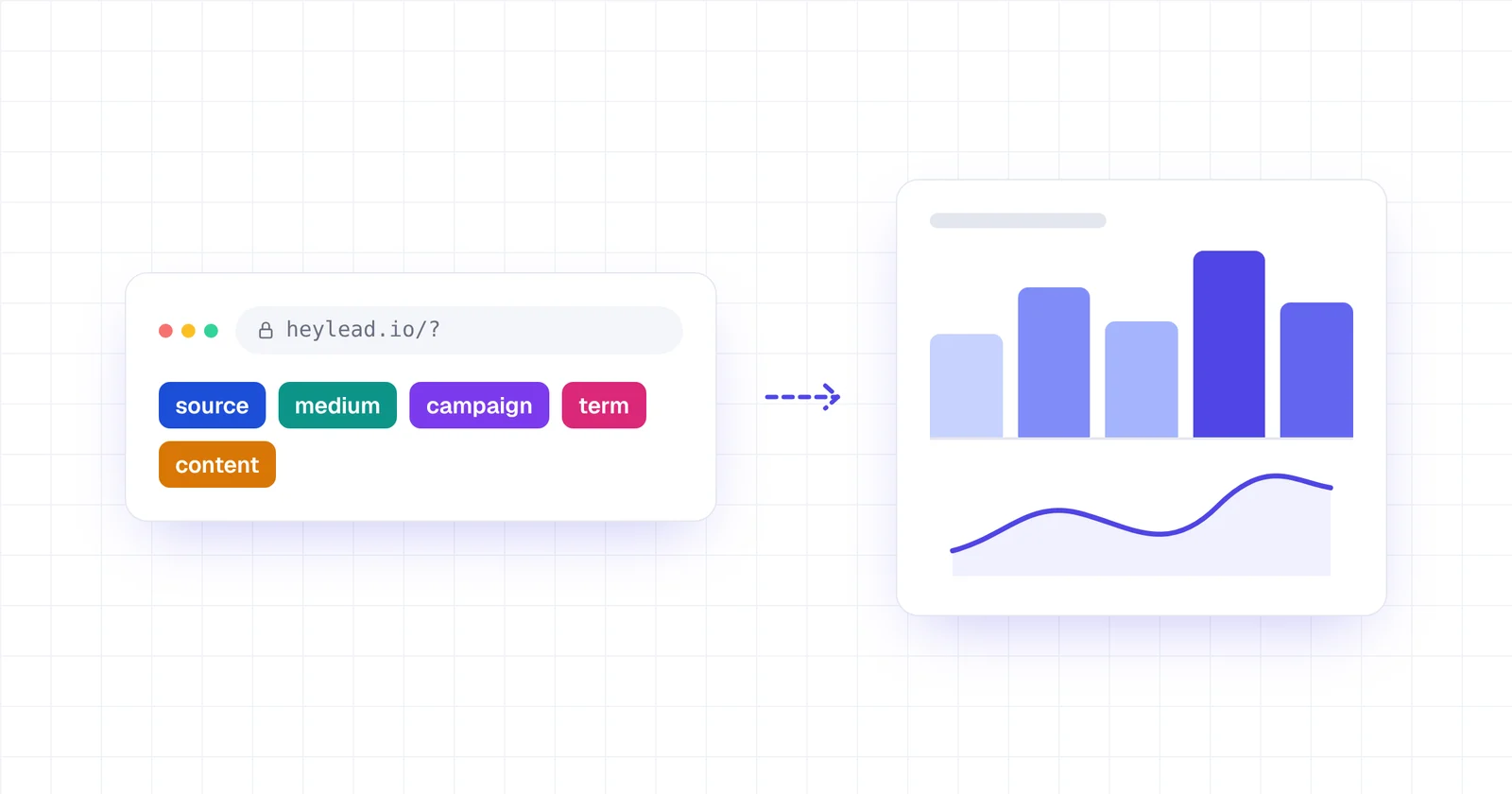
- UTM tags: labels added to the end of a link, such as
utm_source=newsletter&utm_medium=email. Our UTM parameters guide explains each one. - Ad click IDs: codes ad platforms add automatically, such as gclid, gbraid and wbraid from Google Ads and msclkid from Microsoft Ads. TikTok, LinkedIn and X add their own.
- The referrer: the address of the page the visitor came from, such as Google search, another website or a social network.
- AI assistants: visits from ChatGPT, Perplexity, Gemini, Copilot and Claude, recognised by referrer or
utm_source. ChatGPT addsutm_source=chatgpt.comto many links.
HeyLead checks custom channel rules first, then AI assistants, ad click IDs, UTM tags and the referrer, and labels the visit Direct when there's no clue. Facebook's fbclid on its own counts as Organic Social, because Facebook adds it to ordinary post clicks too, so tag your Facebook ads with UTMs.
Why do so many leads show up as Direct?
Leads show up as Direct when a visit arrives with no UTM tags, no click ID and no referrer. Direct means "unknown", not proof that someone typed your address.
Common causes are untagged email links, apps that strip the referrer, redirects that drop tags, and people returning days later. First-touch tracking fixes the last one: the lead may arrive Direct today, but its first visit from an ad is still on record. Our guide on why your CRM says Direct covers every cause and fix.
Which attribution models do these tools use?
Lead attribution tools use attribution models, which are rules for sharing credit between the visits that led to a lead. The common models are first touch, last touch, linear, time decay, position-based and data-driven. Single-touch models give all the credit to one visit; multi-touch models split it.
| Model | What it credits | Best for |
|---|---|---|
| First touch | The visit that first brought the person to your site | Seeing which marketing finds new people |
| Last touch | The visit just before the person became a lead | Seeing what gets people to enquire |
| Linear | Every visit equally | Long journeys where every channel plays a part |
| Time decay | Recent visits more than early ones | Short sales cycles where the final steps matter most |
| Position-based | First and last visits most, middle visits less | Valuing discovery and conversion in one number |
| Data-driven | Whatever patterns an algorithm finds across many conversions | High conversion volumes with an analyst to check results |
Here is how the models split credit on one made-up journey. A lead clicks a Google ad, returns from a blog post found in organic search, opens an email, then clicks a Facebook ad and fills in the form. They become a $3,000 customer.
- First touch gives the Google ad all $3,000; last touch gives the Facebook ad all $3,000.
- Linear gives each touch $750.
- Position-based gives 40% each to the first and last touch and shares the other 20% across the middle: the two ads get $1,200 each, and the blog post and email get $300 each.
- Time decay, with an illustrative 10/20/30/40 split, gives $300, $600, $900 and $1,200 from first visit to last.
The journey is the same every time; only the rule changes.
HeyLead doesn't offer linear, time decay, position-based or data-driven models. It shows the first touch, the last touch and the whole journey of visits for every lead, so you see what happened rather than a calculated share.
Which model should a small business use?
A small business should usually use first touch and last touch side by side, because both are easy to explain and neither needs large amounts of data. First touch answers "what finds us new people?" and last touch answers "what gets them to enquire?". When they differ, the journey shows why.
Multi-touch models make sense with long journeys and hundreds of conversions a month. With 30 leads a month, crediting 0.2 of a customer to one channel is hard to act on. Our guide to first touch vs last touch goes deeper.
What features should lead attribution software have?
Lead attribution software should capture leads automatically, record first and last touch with the full journey, recognise AI assistants, hand leads to your CRM and give you reports you can read without an analyst. Depending on your business, call tracking and consent handling may matter too.
Automatic form capture
Automatic form capture means the tool detects form submissions and saves them with their source, without you editing each form. The alternative is hidden fields: invisible fields you add to every form, which a script fills with source values.
Hidden fields work, but every form needs them, every new form needs them again, and a missed form means leads with no source. Ask any vendor whether their tool needs hidden fields and how long setup takes on your website builder.
First touch, last touch and the full journey
A useful tool records the first touch, the last touch and the visits in between for every lead. For each touch, check it saves the channel, source, medium, campaign, term, content and landing page. Device and country are useful extras. Without the journey, you can't see why first and last touch disagree.
AI assistant tracking
AI assistant tracking means the tool recognises visits from ChatGPT, Perplexity, Gemini, Copilot, Claude and similar assistants and gives them their own channel. Without one, these visits get mixed into Referral or Direct, depending on how the assistant passes them along.
Ask which assistants a tool recognises and whether it reads utm_source values as well as referrers. Our AI lead tracker page shows how HeyLead handles these visits.
CRM hand-off
CRM hand-off is how the tool sends each new lead and its source into the system your team uses. There are three common routes:
- Native sync: a built-in connection to a specific CRM.
- Zapier: a no-code service that passes each lead to other apps, mapping each source field.
- Webhooks: an automatic message sent to an address you choose whenever a lead arrives.
Check that both first-touch and last-touch fields are sent, not one "source" value.
Reports a business owner can read
Reports a business owner can read show leads, customers and revenue by channel, campaign and landing page, compared with the previous period. You should be able to answer "which channel brought the most customers last month?" in under a minute.
Look for CSV downloads, a one-page report to share and a scheduled report email. Lead statuses with deal values turn lead counts into customer and revenue figures, so check how quick marking an outcome is.
Phone call tracking
Phone call tracking shows which marketing made someone call, usually by showing a different number to visitors from each source. If most of your leads phone, it matters more than anything else here.
Call-focused tools such as CallRail and WhatConverts are the stronger choice for call-heavy businesses. HeyLead doesn't track phone calls yet; call tracking is on its roadmap. It doesn't track chat either.
Privacy and consent
Privacy and consent cover how the tool stores visitor data and how it fits the cookie and privacy rules that apply to you. Each lead links a name to a browsing history, so this is personal data. Ask where data is stored, how long it's kept, whether you can delete a lead on request and what the tool needs from your cookie banner.
What types of lead attribution software are there?
Lead attribution software comes in five broad types: form lead source trackers, call and form suites, revenue and multi-touch platforms, B2B account attribution tools, and attribution built into your CRM or analytics. Each is built for a different buyer.
| Type | Examples | Best for | Typical pricing model |
|---|---|---|---|
| Form lead source trackers | HeyLead, Attributer, LeadSources | Small businesses and agencies with web form leads | Flat monthly fee per site, often with a lead limit |
| Call and form tracking | WhatConverts, CallRail | Businesses where many leads phone in | Monthly plans, sometimes with usage charges |
| Revenue and multi-touch | Ruler Analytics, Cometly, Hyros | Larger ad budgets wanting closed-loop revenue | Higher monthly fees, ad-spend based or quote-only |
| B2B account attribution | Dreamdata, HockeyStack | B2B companies with long sales cycles | Enterprise pricing |
| Built into your CRM or analytics | HubSpot attribution, GA4 | Teams already paying for the platform | Free (GA4) or part of higher HubSpot tiers |
Some honest notes:
- Form trackers: Attributer and LeadSources use hidden fields to pass the source to your CRM. HeyLead captures forms without them and adds a dashboard and per-lead journey.
- Call suites: WhatConverts tracks forms, calls and chat. CallRail leads on calls and has added form tracking and AI search attribution.
- Revenue platforms: Ruler Analytics offers closed-loop revenue attribution across forms and calls. Cometly is built for paid media teams and syncs conversions to ad platforms, which HeyLead doesn't do.
- B2B tools track whole companies. Our B2B lead attribution page covers what matters there.
- Built-in options: GA4 has an AI assistant channel, though Perplexity can land in Referral. HubSpot has an AI referrals source but covers only HubSpot contacts.
For side-by-side detail, see our lead source tracking tools comparison.
How do you choose the right lead attribution software?
You choose the right lead attribution software by matching it to how your leads arrive, where they need to end up and who will read the reports, then checking setup effort and pricing. Work through this checklist before you look at vendors:
- How do leads reach you? Forms, calls, chat or bookings. A form-only tool can't help with calls.
- Which website builder do you use? Check forms are captured automatically or need hidden fields.
- Which CRM must leads reach? Look for native sync, Zapier or webhooks with first and last touch.
- How many websites do you run? Agencies need multi-site plans.
- Who reads the reports? Owners need plain leads-and-customers reports.
- How long is setup? Minutes with a script, or days with a developer.
- Do leads come from AI assistants? Check for a separate AI channel.
- How does the price grow? Per site, per lead, by traffic or by ad spend, and on what contract.
- Can you mark outcomes and deal values? Without them you count leads, not customers.
- Can you export your data? CSV and webhooks keep your history if you switch.
Questions to ask in a demo or trial
The questions to ask in a demo or trial test the tool on your own site, because sample data only shows what it looks like.
- Can I install it myself today on my website builder?
- Does it capture every form, including pop-ups and booking forms, without changes?
- Does a test lead from a tagged link show the right channel, campaign and landing page?
- What does a lead look like after three visits from three channels?
- Which fields arrive in my CRM?
- What happens to my data if I cancel?
Red flags
Red flags are signs a tool will cost more or deliver less than it seems:
- Usage fees on top of the plan: per-lead or per-call charges make costs hard to predict.
- Annual lock-in with no trial: you can't test it on your own leads first.
- "100% accurate" claims: every tool misses some visits, such as device switches.
- A developer for every form: some forms will go untracked.
- One source value per lead: without first and last touch, you lose half the story.
How much does lead attribution software cost?
Lead attribution software costs anything from nothing, for built-in analytics, to several hundred a month or a custom quote for revenue platforms. The pricing model matters more than the starting price, because it decides how your bill grows.
- Flat fee per site: one monthly price per website, often with a lead limit.
- Per lead or per call: the bill rises with every lead, so success costs more.
- By traffic: priced by visitors, which can jump with one busy month.
- By ad spend: the more you spend on ads, the more the tool costs.
- Quote-only: no public price, usually an annual contract.
Listed starting prices, from third-party software listings rather than vendors' own sites: Attributer is listed from about $29 a month and LeadSources from about $48. WhatConverts is listed at $30 a month for calls only, with forms from $60 a month plus usage. CallRail's call and form tracking is listed at about $100 a month. Ruler Analytics is listed at about £179–199 a month, often on annual contracts, and Cometly from $99 to $750 a month by usage or ad spend. Hyros is quote-based. Check each vendor's site for current prices.
HeyLead charges a flat monthly price per plan, with multi-site plans for agencies. See HeyLead pricing for plans and the trial.
How do you set up lead attribution software?
You set up lead attribution software by installing the script, tagging your links, testing with a few leads and marking outcomes for a month before making a budget decision. The install takes minutes; marking outcomes is what makes the data useful.
| Week | What to do | Done when |
|---|---|---|
| Week 1 | Install the script on every page; add UTM tags to email, social and ad links | The script loads everywhere and main links carry tags |
| Week 2 | Submit test leads from tagged links; connect your CRM; delete the tests | Test leads show the right channel and reach the CRM |
| Week 3 | Mark every lead Qualified, Customer or Lost, with deal values | No lead older than a few days is still New |
| Week 4 | Compare customers and revenue by channel and campaign | You've made one budget decision based on customers |
For week 1, our UTM parameters guide explains tagging, and the guide on which Google Ads keywords bring customers covers Google Ads. With HeyLead, the install is one script tag or the WordPress plugin, about 5 minutes.
Keep the first decision small. One month of leads is a small sample, so shift part of a budget rather than cutting a channel.
Common mistakes when buying or using lead attribution software
The common mistakes with lead attribution software are buying more tool than you need and then not feeding it the outcomes that make it useful:
- Judging by clicks or leads, not customers: cheap leads with no customers are the most expensive.
- Untagged email links: they often arrive with no referrer and show as Direct.
- Tagging internal links: UTM tags on your own site's links overwrite the real source.
- Enterprise multi-touch for 50 leads a month: complex models need volume.
- Never marking outcomes: reports stop at lead counts.
- Expecting a match with ad platforms: they count by their own rules.
- Ignoring calls: if half your leads phone, a form tool shows half your marketing.
Key takeaways
- Lead attribution software records the channel, campaign and landing page behind each named lead, and credits that marketing when the lead becomes a customer.
- It reads UTM tags, click IDs, the referrer and AI assistant signals, and saves first touch, last touch and the journey with each lead.
- First and last touch side by side suit most small businesses better than multi-touch models.
- Choose by how leads arrive, which CRM they must reach, setup effort and how the price grows.
- Mark every outcome and judge channels by customers and revenue, not clicks.
Related guides
Frequently asked questions
What is lead attribution software?
Lead attribution software records which channel, campaign and page brought each lead and saves it with the lead's details. Once you mark outcomes, it shows which marketing brings customers, not just enquiries.
Is Google Analytics a lead attribution tool?
Not on its own. Google Analytics reports anonymous visits and conversions by channel, but doesn't show the source next to each named lead or follow that lead to a sale. See our Google Analytics comparison.
What is the difference between lead attribution and marketing attribution?
Lead attribution records what brought each person. Marketing attribution adds those results up by channel and campaign. Most small businesses need the first to trust the second.
Which attribution model is best for small businesses?
First touch and last touch side by side suit most small businesses, because they're easy to read and need no large data volumes. Our first touch vs last touch guide explains when to use each.
Do I need lead attribution software if I use HubSpot?
It depends on your plan and how leads arrive. HubSpot's attribution is built into its Marketing Hub, but not every tier includes it and it only covers contacts in HubSpot. Our HubSpot attribution comparison sets out when a separate tool helps.
Can lead attribution software track leads from ChatGPT?
Some tools can. Visits from ChatGPT, Perplexity, Gemini, Copilot or Claude can be recognised from the referrer or a utm_source value such as chatgpt.com. Check that the tool gives them their own channel.
How much does lead attribution software cost?
Prices range from free built-in reports to quote-only platforms with annual contracts. Form trackers usually charge a flat monthly fee per site, while ad platforms often price by ad spend. Check each vendor's site, and see HeyLead pricing.