Quick answer
- Dental practices and clinics often can't tell which marketing brings new patients, because bookings arrive by phone, online booking tools and forms, and every platform claims credit.
- Track the source of every new patient enquiry automatically, tag your Google Business Profile and social links, and record which enquiries became booked and attended appointments.
- Keep health details out of tracked forms; ask for name, contact details and the type of appointment only, and collect medical history in your practice system.
- Online booking tools that run inside a frame from another site need hidden fields or URL parameters to receive the source.
- Judge each channel by cost per new patient and patient value, not by clicks or form fills.
Dental practices can track new patient sources by recording where every enquiry and booking request came from (Google Ads, the Maps listing, social media, a referral) and then noting which of those enquiries became attended appointments. It shows which marketing fills the diary with the treatments you want, without collecting any health information.
A typical practice markets in several places at once: a Google Business Profile, Google Ads for high-value treatments, Instagram, a booking widget, a referral scheme and perhaps a directory. Reception asks "How did you hear about us?" and hears "Google" or "a friend". The marketing agency reports clicks, the booking tool reports bookings, and nobody can say which spend brought the patients who stayed.
This guide explains the problem, then a practical system to solve it, with a clear line on what not to collect.
Why don't dental practices know where new patients come from?
Dental practices lose track of new patient sources because patients reach them through phones, booking tools and forms at once, and each marketing platform counts its own results. Without one record of the source of every enquiry, the numbers from Google, social media and agencies overlap and can't be compared.
The usual problems:
- Bookings come in three ways. Phone calls, an online booking widget and a contact form, each with different or no source information.
- Reception answers are vague. "Google" can mean an ad, the Maps listing or a search result, and patients forget what they clicked.
- Platforms double count. A patient who saw your Instagram post, then searched and clicked your Google ad, may be counted by both.
- Booking tools hide the source. Widgets that run inside a frame from another site often record the booking but not the ad or page that led to it.
- Enquiries aren't joined to patients. Few practices record which enquiries attended and what treatment they had, so cheap enquiries look as good as valuable ones.
The result is that budget follows the most persuasive report, not the channel that brings patients who attend and return.
What does not knowing your patient sources cost?
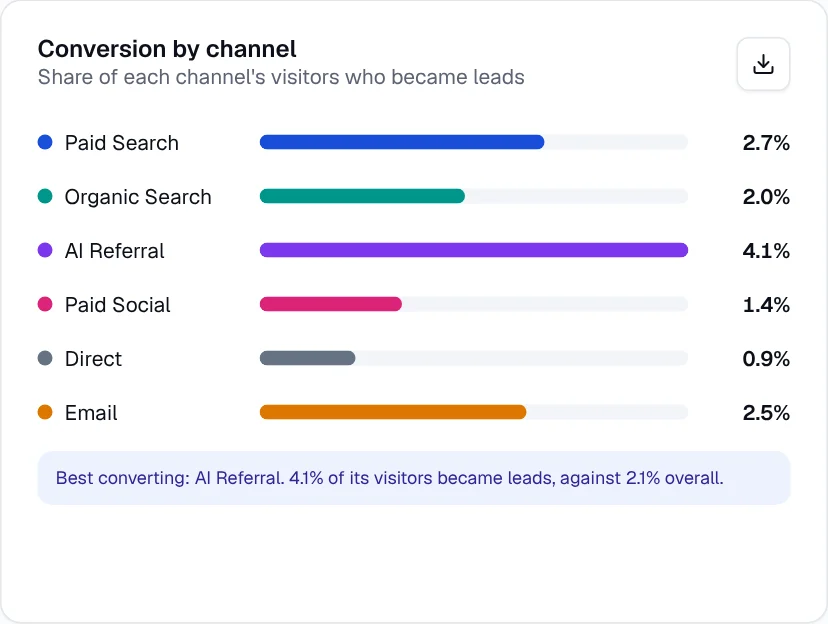
Not knowing your patient sources costs money because high-value treatments make the gap between channels large. A channel that brings check-ups and a channel that brings implant consultations can look identical in a click report.
An example with made-up numbers for a practice spending £4,000 a month:
| Channel | Monthly spend | Enquiries | New patients | Cost per enquiry | Cost per new patient |
|---|---|---|---|---|---|
| Google Ads (implants) | £2,000 | 25 | 8 | £80 | £250 |
| Instagram ads | £1,000 | 45 | 6 | £22 | £167 |
| Lead-generation directory | £1,000 | 30 | 3 | £33 | £333 |
Instagram looks cheapest per new patient. But if an implant patient is worth many times a check-up, Google Ads may still be the better investment. You can only make that call when every enquiry is tied to an outcome and a value.
What should a dental practice track, and what should it not?
A dental practice should track the marketing source of each enquiry and its outcome, and should not collect health information through tracked forms. The marketing question is "where did this patient come from?", which never needs medical details.
| Track this | Example | Why |
|---|---|---|
| Channel | Paid Search, Google Business Profile | Where to spend |
| Campaign or listing | implants-leeds, listing-headingley | Which ad, treatment or location works |
| Landing page | /dental-implants, /invisalign | Which treatment pages convert |
| Outcome and value | Attended, treatment plan value | Turns enquiries into revenue per channel |
| Don't collect in tracked forms | Collect it instead in |
|---|---|
| Symptoms or pain descriptions | Your clinical or practice management system |
| Medical history or medication | The patient registration process |
| Insurance or medical numbers | The secure patient portal or at reception |
Keep website forms to name, contact details, preferred time and the type of appointment, such as check-up, hygiene, implants or whitening. HeyLead's terms ask customers not to collect health information through tracked forms, and keeping forms short also gets more people to fill them in.
How do you track new patients from each channel?
Each channel needs its links tagged so visits arrive with a clear source, and then a lead tracker records the source of every enquiry automatically. This table covers the channels most practices use.
| Channel | How to track it | What you'll see |
|---|---|---|
| Google Business Profile | Add utm_source=gbp&utm_medium=organic to website and booking links | A Google Business Profile channel |
| Google Ads | Keep auto-tagging on and add a tracking template with the keyword | Paid Search, by treatment campaign |
| Organic search | Nothing to tag; tracked automatically | Organic Search, by landing page |
| Instagram and Facebook | Tag the bio link and add URL parameters in Ads Manager | Organic Social and Paid Social |
| Email and SMS recalls | Tag every link with utm_medium=email or sms | Email, by campaign |
| Referral scheme | Give patients a tagged link, or ask on the form | Referral, or a Referrals channel |
| Directories and review sites | Tag the website link where allowed | Referral, or a Directories channel |
| AI assistants | Nothing to tag; recognised automatically | AI Referral, by assistant |
Google Business Profile
For most practices, the Maps listing is a top source of new patients. Without tags, those visits blend into organic search. Tag the website and booking links, and if you have several sites, keep the source and medium the same and put the location in the campaign. The Google Business Profile guide shows every link to tag.
Google Ads for treatments
Run separate campaigns for high-value treatments such as implants, aligners or cosmetic work, and send each to its own treatment page. With auto-tagging and a keyword in utm_term, every enquiry shows the campaign and search term. Our guide to which Google Ads keywords bring customers explains the setup.
Instagram and Facebook
Social is strong for cosmetic treatments and whitening offers. Tag the link in your bio and stories, and set URL parameters in Ads Manager, so organic posts and paid ads are separated. The Facebook ads lead tracking guide has the exact parameters.
Referrals from existing patients
Word of mouth is often a practice's best source, and the hardest to measure. Give each patient who joins your referral scheme a link with utm_source=referral and their own campaign, or add a "Who referred you?" field to the form. Either way, referrals become a channel you can count.
How do you track bookings from online booking tools?
Online booking tools need special care because many of them run inside a frame from another site, and a website tracker can't see inside that frame. The fix is to pass the source into the booking tool so it travels with the booking.
| Booking setup | What happens | What to do |
|---|---|---|
| A form on your own page | Captured automatically with its source | Nothing |
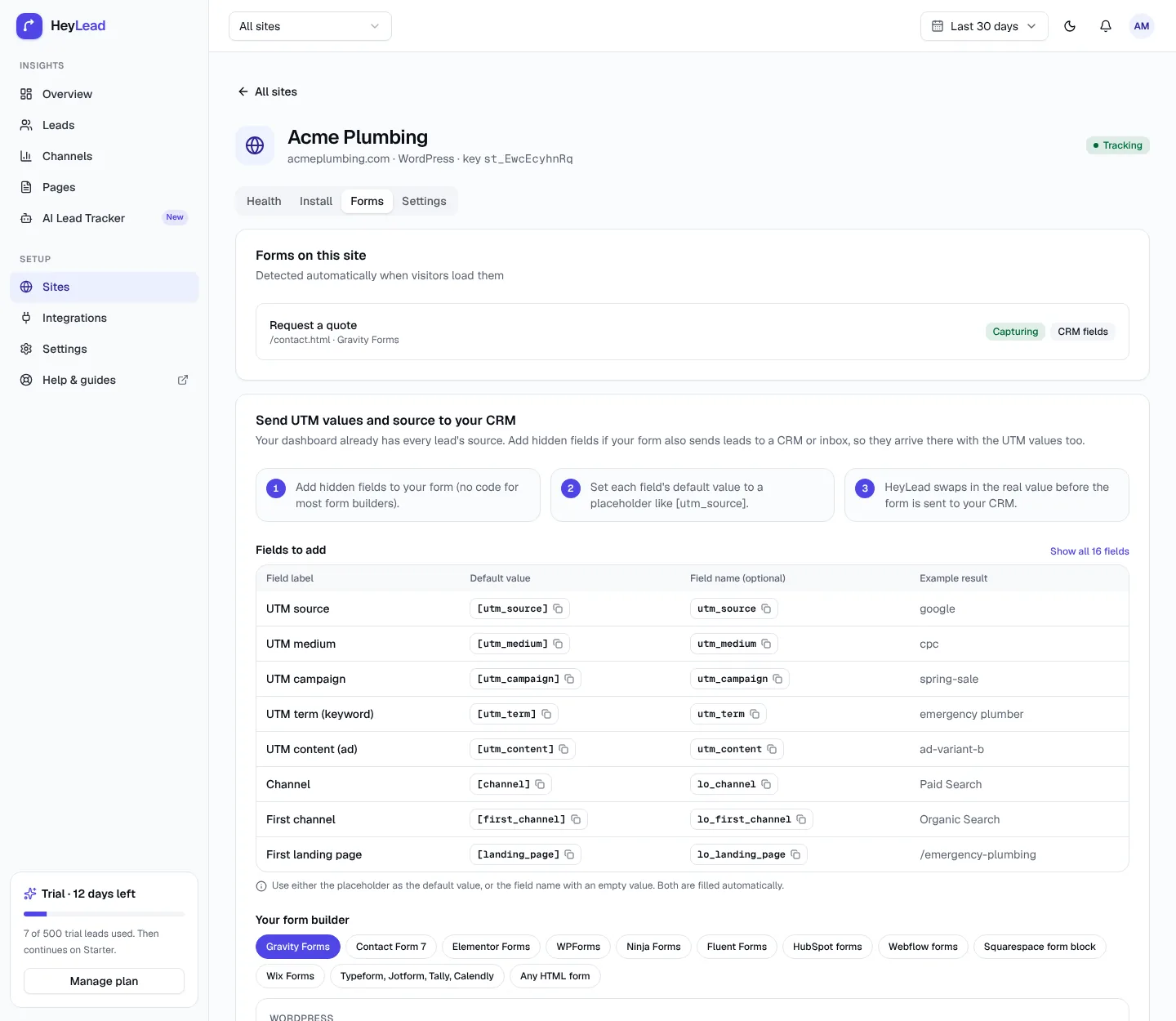
| Embedded tool that supports hidden fields | The tool records the booking; HeyLead adds the UTM values to the embed's address | Add hidden fields named utm_source, utm_medium, utm_campaign and lo_channel in the tool |
| Embedded tool that accepts URL parameters | UTM values can be added to the booking link | Pass the visitor's UTM values in the link |
| A booking site on another domain | The visitor leaves your site before booking | Tag the link and check the tool's own source reports |
HeyLead lists the hidden fields to add on each site's Forms tab, and passes the visitor's UTM values into supported embedded tools such as Typeform, Jotform, Tally and Calendly, which stores UTM values with each booking. If your practice booking widget doesn't support hidden fields or URL parameters, a short "Request an appointment" form on your own page is the most reliable way to keep the source. Bookings made inside an embedded tool stay in that tool rather than your HeyLead dashboard, so send them on to your CRM from there.
How should a practice track phone bookings?
Phone bookings need their own method, because a website lead tracker records forms, not calls. HeyLead records form enquiries with their full source; it does not record phone calls.
| Option | How it works | Best for |
|---|---|---|
| Call tracking service | Different phone numbers per channel, each call recorded | Practices where most bookings phone in |
| Request-a-callback form | Short online form next to the phone number | Moving some calls online, free |
| Reception asks and logs | One question at booking, recorded in the practice system | Small practices |
Most practices combine a callback form with a simple reception question. If phone bookings dominate, a call tracking service is worth comparing; our comparison pages explain honestly when a call tracking tool is the better fit.
How do you measure new patients and patient value?
You measure new patients and their value by recording what happened to each enquiry: whether they booked, attended and accepted a treatment plan, and what it was worth. With outcomes recorded, reports show patients and revenue per channel rather than form fills.
In HeyLead, each lead has a status, such as new, qualified, customer or lost, and a value. When a new patient attends and pays, mark the lead as a customer and enter the value. The Channels report then shows new patients and revenue next to enquiries for every channel and campaign.
| Measure | Formula | What it tells you |
|---|---|---|
| Cost per enquiry | Spend ÷ enquiries | How cheaply a channel brings enquiries |
| Attendance rate | New patients ÷ enquiries | How many enquiries become patients |
| Cost per new patient | Spend ÷ new patients | What a patient costs on each channel |
| Return on spend | Patient revenue from the channel ÷ spend | Whether the channel pays for itself |
Review it monthly and move budget towards channels with the best return, not the most enquiries.
Which pages should a practice build and track?
The pages people land on decide whether a visit becomes an enquiry, so build one page per high-value treatment and per location, and watch how each one converts. A single generic "Services" page makes it impossible to tell implant interest from check-up interest.
| Page type | Example | What to watch |
|---|---|---|
| Treatment page | /dental-implants, /invisalign | Enquiries and new patients per treatment |
| Location page | /dentist-headingley | Which branch or area converts best |
| Offer page | /new-patient-offer | Whether an offer brings patients who return |
| Emergency page | /emergency-dentist | Urgent enquiries, often by phone |
| Fees page | /fees | How often price-checkers go on to enquire |
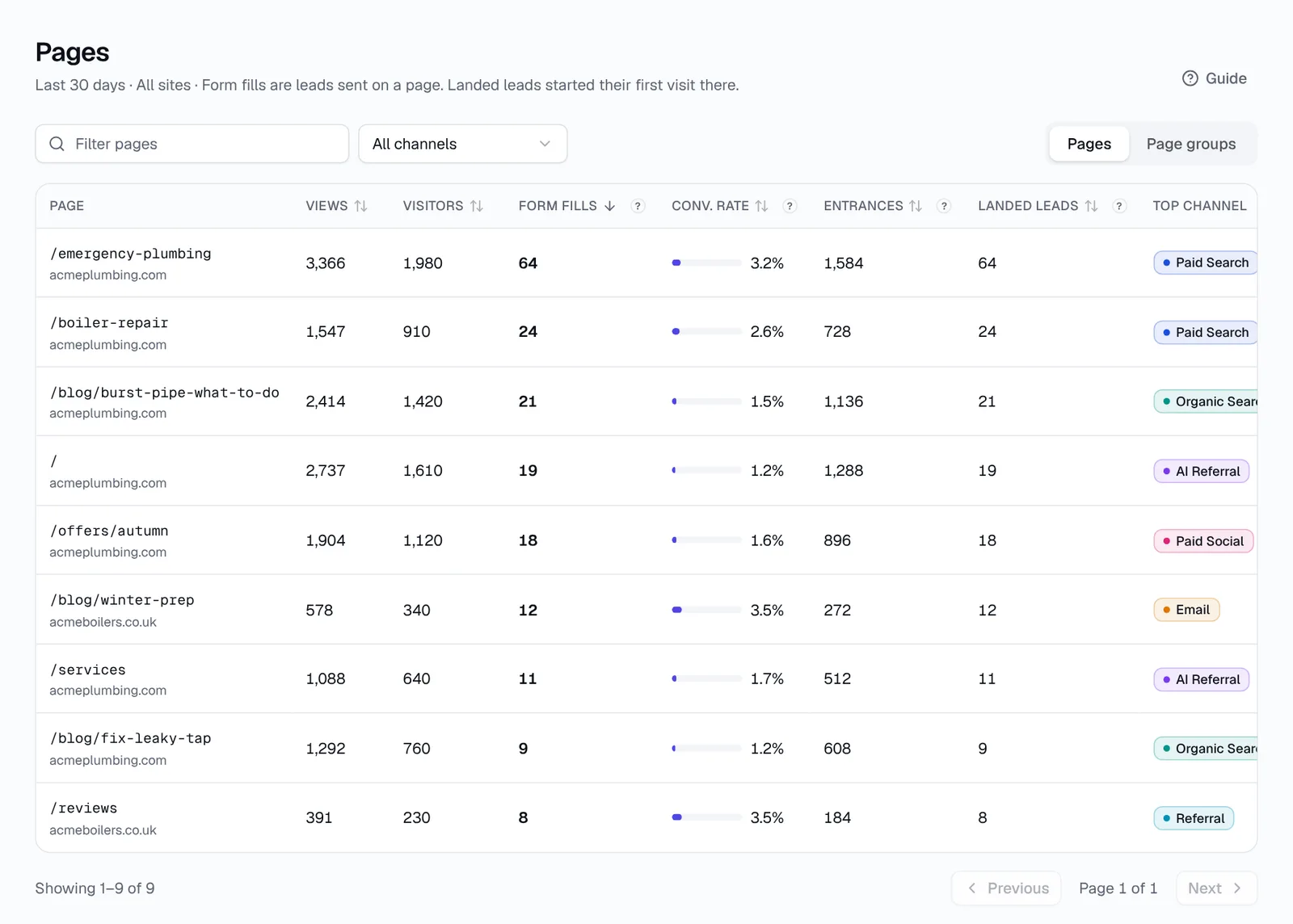
HeyLead's Pages report lists every page with its views, form fills, conversion rate and top channel, and shows which pages started a lead's first visit. Pair each Google Ads campaign with its treatment page so ad, page and outcome line up in one report.
How do reviews and reputation sites fit in?
Reviews rarely send leads directly, but they strongly affect whether people who find you go on to book. Patients often read Google reviews, a review site or a directory listing before they enquire, even when they arrived from an ad or search result.
- Google reviews sit on your Business Profile, so a well-reviewed profile shows up as more Google Business Profile leads in your reports.
- Review and directory sites that link to your website arrive as referrals from their domain; tag your profile link where the site allows it, or group them with a channel rule.
- Review requests by email or text can carry tagged links back to your site, so you can see whether happy patients refer friends or book again.
Watch the trend: if a branch's Maps leads rise after a push for reviews, the reviews are working.
How do you set up patient source tracking, step by step?
Setting up patient source tracking takes under 30 minutes for most practice websites.
- Install a lead tracker. With HeyLead, use the WordPress plugin, paste one line into your site settings, or add it through Google Tag Manager. Existing forms are found automatically.
- Trim your forms. Remove any health questions from website forms; keep name, contact details, preferred time and appointment type.
- Connect your booking tool. Add hidden fields if it runs inside a frame, or add a short request form on your own page.
- Tag your Google Business Profile. Website and booking links on every location.
- Tag social links. Bio links, stories and ad URL parameters.
- Set up referrals. Tagged links for your referral scheme or a "Who referred you?" field.
- Decide on phone tracking. A callback form, a reception question or a call tracking service.
- Record outcomes weekly. Mark attended new patients as customers with their value.
What are the most common patient tracking mistakes?
- Asking health questions in website forms. It adds risk and puts people off. Collect clinical details in your practice system.
- Judging channels by enquiries. A cheap whitening enquiry and an implant consultation are not worth the same.
- Leaving the Maps listing untagged. Its patients then hide inside organic search.
- Trusting each platform's own numbers. Agencies, social platforms and booking tools each count the same patient.
- Ignoring the booking widget. If it runs in a frame without hidden fields, its bookings arrive with no source.
- Never recording outcomes. Without marking attended patients, you can't see revenue by channel.
Key takeaways
- Practices lose track of patient sources because bookings arrive by phone, booking tools and forms, and every platform claims credit.
- Track channel, campaign, landing page and outcome for every enquiry, and never health details.
- Tag your Google Business Profile, social links and referral links; connect booking widgets with hidden fields.
- Phone bookings need a callback form, a reception question or call tracking.
- Compare channels by cost per new patient and patient value.
See how HeyLead works for local services businesses, how lead source tracking works across every channel, or check pricing for one practice website.
Frequently asked questions
How can a dental practice track where new patients come from?
Install a lead tracker on the practice website so every enquiry and booking request arrives with its channel and campaign, tag the links on your Google Business Profile and social profiles, and note which enquiries became attended appointments. Phone bookings need a call tracking number or a question at reception.
Is it safe to track patient enquiries?
Track the marketing source, not health information. Keep tracked forms to name, contact details, preferred time and appointment type, and collect symptoms or medical history in your clinical system. HeyLead's terms ask customers not to collect health information through tracked forms.
Can I track bookings from an online booking system?
It depends on how the booking tool is embedded. Forms on your own pages are captured automatically. Booking tools that run inside a frame from another site, such as Calendly or a practice booking widget, need hidden fields or URL parameters so the source travels with the booking.
Which marketing channels bring the most new dental patients?
It varies by practice and area, which is exactly why tracking matters. Common sources are the Google Business Profile, Google Ads for treatments such as implants or Invisalign, organic search, Instagram and Facebook, and referrals from existing patients.
How do I track Google Business Profile bookings for my practice?
Add UTM tags to the website and booking links on your profile, such as utm_source=gbp and utm_medium=organic, with the location in utm_campaign. Visits from your Maps listing then arrive tagged and are counted as their own channel.
What should a clinic measure, enquiries or patients?
Patients. Track cost per new patient and the value of each patient over time, because a treatment like implants or aligners is worth far more than a check-up. Mark each lead as a customer with a value once they attend and pay.
Does this work for med spas, physiotherapy and other clinics?
Yes. Any clinic that takes enquiries or bookings through its website can use the same approach, with the same rule of keeping health details out of tracked forms.
How long does setup take for a practice website?
Usually under 30 minutes. Installing HeyLead with the WordPress plugin or one script takes a few minutes, existing forms are found automatically, and tagging your profile and social links takes another 15 minutes.