Quick answer
- Coaches and course creators get leads from Instagram, YouTube, podcasts, guest appearances, webinars and email, often over weeks, so it is hard to see which content really brings buyers.
- Tag every link you share, record the first and the latest source of each sign-up, and mark which leads became paying clients.
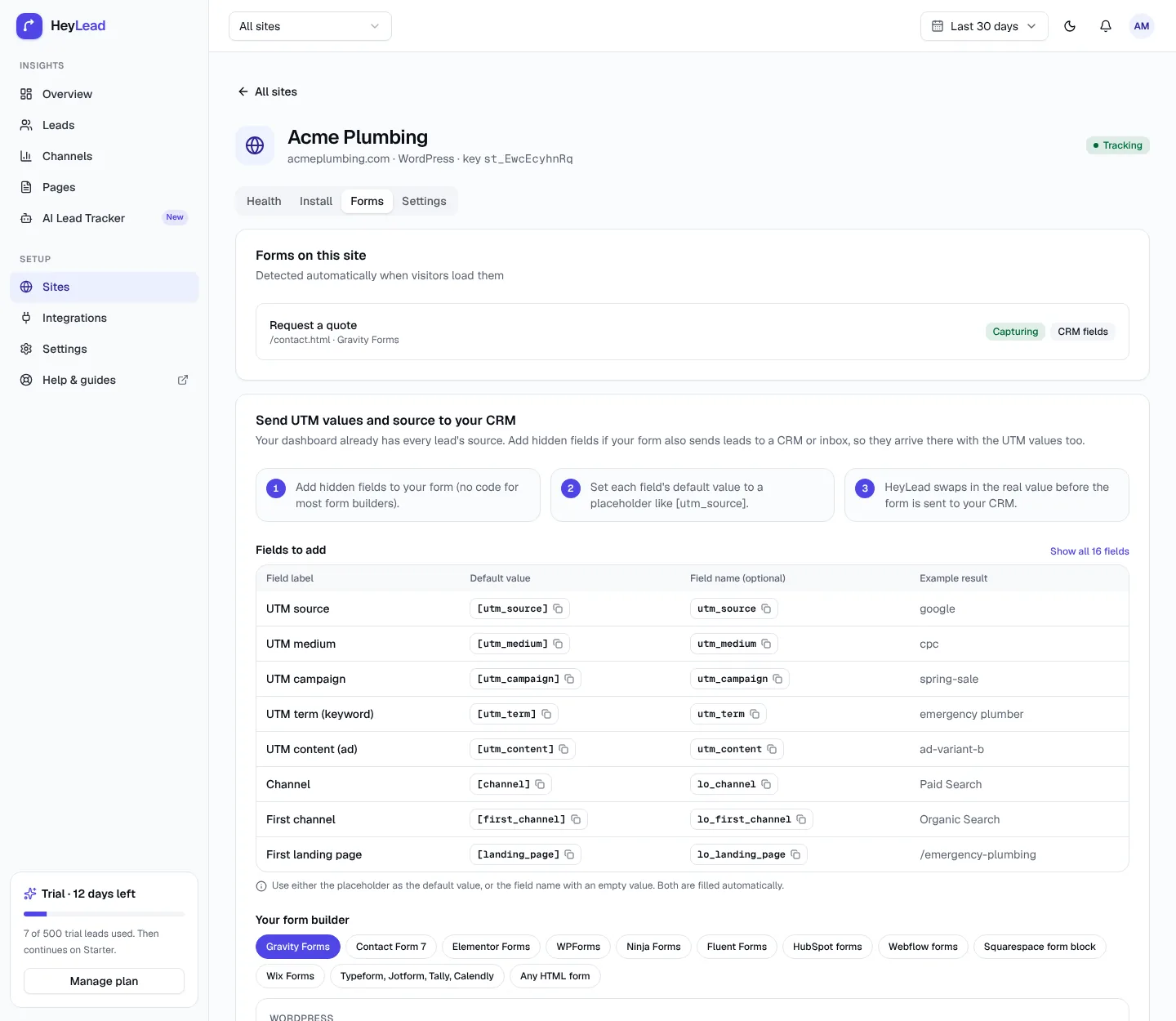
- Webinar, quiz and booking forms that run inside a frame from another site need hidden fields or URL parameters to keep the source.
- First touch shows which content brings people in; the latest touch shows what convinced them to book or buy.
- Compare content and channels by clients and revenue, not followers, views or opt-ins.
Lead tracking for coaches and course creators means recording where every opt-in, webinar sign-up and discovery-call booking came from, and which of those people went on to buy. It shows which posts, videos, podcasts and emails bring paying clients, so you can spend your limited time on the content that grows the business.
Coaches market everywhere at once: Instagram posts and stories, YouTube videos, a podcast, guest spots on other shows, LinkedIn, a free webinar, a quiz funnel and a weekly email. People follow you for weeks before they book a call. By the time they buy, nobody remembers which video first caught their attention, and every platform's analytics shows views, not clients.
This guide explains the problem and a simple system that fixes it, from tagging links to marking which leads became clients.
Why is it hard for coaches to know which content brings clients?
It is hard for coaches to know which content brings clients because people discover them on one platform, warm up on another and buy weeks later, often after an email or webinar. Each platform reports views and clicks for its own part of the journey, and none of them knows who eventually paid.
The common problems:
- Long, multi-platform journeys. Someone hears you on a podcast, follows you on Instagram, joins a webinar a month later and books a call from an email.
- Social apps pass little detail. Clicks from Instagram and TikTok often arrive with almost no referrer information unless the link is tagged.
- Funnel tools sit on other domains. Webinar platforms, quiz tools and booking calendars often run inside a frame or on their own site, where the source gets lost.
- Vanity metrics. Followers, views and opt-ins are easy to see; clients and revenue by source are not.
- "Where did you hear about me?" is unreliable. People say Instagram when it was really a guest podcast that sent them to Instagram.
So content decisions get made on views, and the channels that quietly bring buyers go unnoticed.
What does not knowing your best channels cost?
Not knowing your best channels costs time more than money. Most coaches have a few hours a week for marketing, and spending them on the wrong platform slows growth for months.
An example with made-up numbers for one quarter:
| Source | Time or spend | Opt-ins | Discovery calls | Clients | Revenue |
|---|---|---|---|---|---|
| 6 hours a week | 220 | 12 | 3 | $4,500 | |
| Podcast guest spots | 4 shows | 60 | 10 | 5 | $7,500 |
| YouTube | 3 hours a week | 90 | 6 | 2 | $3,000 |
| Facebook ads | $1,500 | 300 | 8 | 2 | $3,000 |
By opt-ins, Facebook ads and Instagram win. By clients and revenue, four podcast appearances beat everything. Without tracking, you would keep posting daily and skip the podcast invitations.
What should a coach or course creator track?
A coach should track five things for every lead: the first source, the latest source before they signed up, the campaign or piece of content, the page or funnel step, and whether they became a client with the value. Those five answer nearly every marketing question.
| What to record | Example | Why it matters |
|---|---|---|
| First source | Podcast, Instagram, YouTube | Which content brings new people in |
| Latest source | Email, webinar reminder, retargeting ad | What finally made them act |
| Campaign or content | spring-webinar, reel-pricing-tips | Which post, video or launch worked |
| Page or funnel step | /free-masterclass, /book-a-call | Which pages convert visitors |
| Outcome and value | Client, $1,500 programme | Revenue by source |
How do you tag links for each platform?
Tag every link you share with UTM tags, short labels added to the end of a link, so visitors arrive with a clear source. Platforms that strip referrer details make tags essential rather than optional.
| Platform | Where to put the tagged link | Example tags |
|---|---|---|
| Bio link, story link stickers | utm_source=instagram&utm_medium=organic_social&utm_campaign=bio | |
| YouTube | Description and pinned comment | utm_source=youtube&utm_medium=organic_social&utm_content=video-name |
| Podcast (your own) | Show notes and a spoken short link | utm_source=podcast&utm_medium=referral&utm_campaign=episode-42 |
| Guest appearances | A short link per show | utm_source=show-name&utm_medium=referral |
| Profile and post links | utm_source=linkedin&utm_medium=organic_social | |
| Email newsletter | Every link | utm_source=newsletter&utm_medium=email&utm_campaign=week-12 |
| Facebook and Instagram ads | URL parameters in Ads Manager | utm_source=facebook&utm_medium=paid_social |
Build the links with a UTM builder and follow one naming scheme so reports stay tidy. Our UTM naming conventions guide gives a copyable template.
Short links for audio and video
On a podcast or in a video, nobody types a long tagged link. Create a short, memorable link on your own domain, such as yoursite.com/podcast, that redirects to the full tagged URL. Mention it on air and put it in the show notes, and every listener arrives tagged.
How do you track webinar, quiz and booking sign-ups?
Webinar, quiz and booking sign-ups are tracked automatically when the form sits on your own page, and need hidden fields when the form runs inside a frame from another tool. The aim is the same either way: the source must travel with the sign-up.
| Setup | What happens | What to do |
|---|---|---|
| Form on your own page or funnel page | Captured automatically with first and latest source | Nothing |
| Embedded Typeform, Jotform, Tally or Calendly | HeyLead passes the visitor's UTM values into the embed | Add hidden fields or URL parameters with the names HeyLead lists |
| Webinar or checkout on another domain | The visitor leaves your site before signing up | Tag the link and use the tool's own source fields |
HeyLead installs on Kajabi, ClickFunnels and GoHighLevel pages with one script, as well as WordPress, Squarespace, Wix and Webflow, and finds the forms on those pages by itself.
How do first touch and latest touch help coaches?
First touch and latest touch help coaches because they answer different questions. First touch is the source of the visit that first brought someone to you; latest touch is the source just before they signed up or booked.
| Question | Look at | Example |
|---|---|---|
| Which content brings new people into my world? | First touch | Podcast guest spots and YouTube |
| What makes people finally book a call? | Latest touch | The webinar reminder email |
| Where should I spend content time? | First touch | More guest spots, fewer daily reels |
| What should I improve before a launch? | Latest touch | Email sequence and sales page |
HeyLead keeps every visit in a lead's journey, so you can see both, plus everything in between. Our first touch vs last touch guide explains when to use each.
How do you turn leads into clients and revenue by source?
You turn leads into clients and revenue by recording what happened after each sign-up: whether they booked a call, bought a programme or course, and how much it was worth. Then every report shows revenue by source, not just opt-ins.
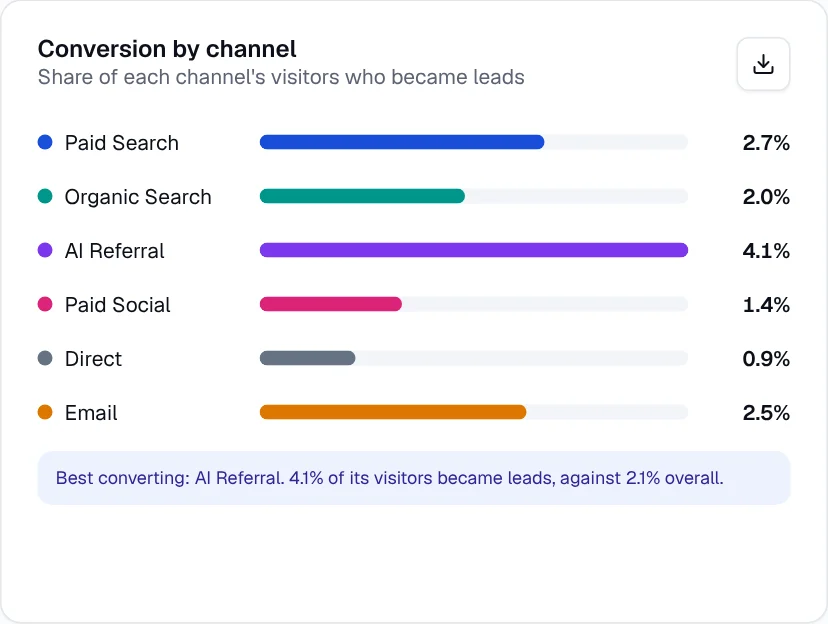
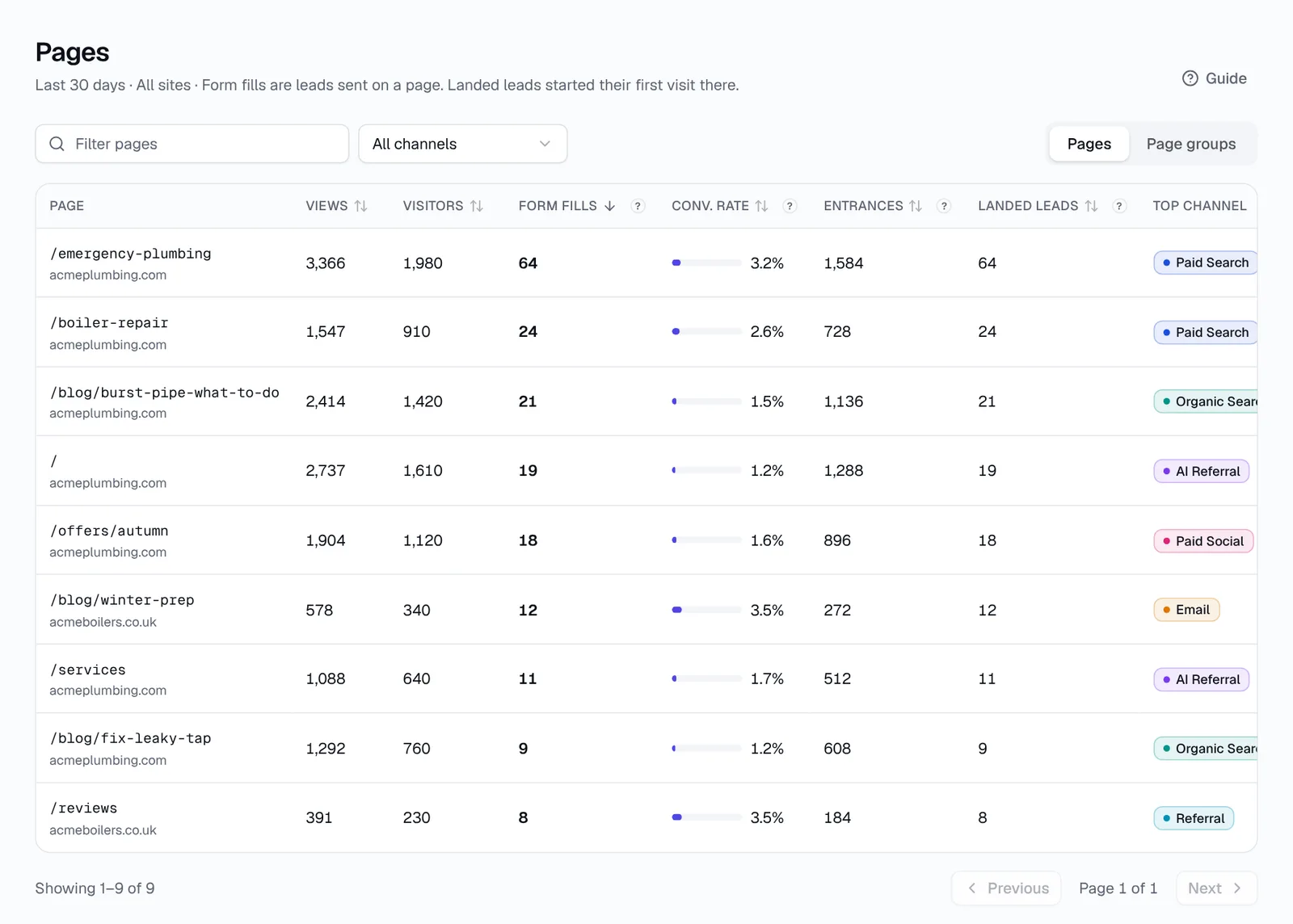
In HeyLead, each lead has a status, such as new, qualified, customer or lost, and a value. When someone buys, mark them as a customer and enter the purchase value. The Channels and Pages reports then show clients and revenue next to opt-ins.
| Measure | Formula | What it tells you |
|---|---|---|
| Opt-in rate | Opt-ins ÷ visitors | How well a page or offer converts |
| Call booking rate | Calls booked ÷ opt-ins | How warm those leads are |
| Client rate | Clients ÷ calls booked | How well calls convert |
| Revenue per source | Sum of client value by source | Where your income really comes from |
| Cost per client | Ad spend ÷ clients | Whether paid ads pay for themselves |
How do you track a launch from start to finish?
A launch, such as a challenge, webinar or cart-open week, compresses months of marketing into a few weeks, so tracking it well tells you exactly what to repeat next time. Give the whole launch one campaign name and tag every link with it.
| Launch stage | What to tag | What to measure |
|---|---|---|
| Warm-up content | Posts, videos and emails with the launch campaign | Opt-ins by source |
| Free event sign-up | Registration page links from every platform | Sign-ups by first and latest source |
| Event and replays | Reminder and replay emails | Attendance and replay views |
| Cart open | Sales emails, ads and social posts | Purchases by latest source |
| Cart close | Final emails and retargeting ads | Last-day purchases by source |
Name every link in the launch the same way, for example utm_campaign=spring-launch-2026, and change only utm_content for each post, email or ad. After the launch, the campaign report shows which pieces brought sign-ups and which brought buyers. Comparing launches over time is then a matter of comparing campaign names.
How do you track affiliates and joint-venture partners?
Affiliates and joint-venture partners promote your offer to their audience, so you need to know exactly which partner sent each lead and buyer. Many affiliate platforms track sales, but they don't show you the leads, the journey or the buyers who came back later through another channel.
- Give each partner a tagged link, such as
utm_source=partner-name&utm_medium=affiliate&utm_campaign=spring-launch-2026. - Use a short link per partner for podcasts, videos or live events, so their audience doesn't have to type a long address.
- Compare partners by buyers and revenue, not clicks. A partner with a small, engaged list can outperform a much bigger one.
- Check first touch too. A partner who first introduced someone deserves credit even if the sale happened later from your own email.
HeyLead groups utm_medium=affiliate under the Affiliates channel automatically, so partner leads stay separate from your own social and email.
How do you track free challenges and online communities?
Free challenges, Facebook groups, Skool or Circle communities and Discord servers are where many coaches build trust before selling. Tracking them means tagging the links that lead from the community to your offers and noticing the leads they produce.
Tag the links you post inside communities with the community as the source, such as utm_source=skool&utm_medium=community, and set up a channel rule that groups community sources together. Then you can see whether time spent in your community turns into calls and clients, or just into engagement.
How do you set up lead tracking for a coaching business?
Setting up lead tracking for a coaching or course business takes about an hour, most of it tagging links.
- Install a lead tracker. Add HeyLead to your website or funnel builder with the plugin or one script.
- Check your forms. Opt-in and booking forms on your own pages are found automatically; add hidden fields to embedded tools.
- Tag your bio links. Instagram, TikTok, YouTube and LinkedIn.
- Make short links for audio. One per podcast and guest show.
- Tag your emails. Every link in newsletters and sequences.
- Tag your ads. URL parameters in Ads Manager.
- Record outcomes. Mark buyers as customers with their purchase value.
- Review monthly. Compare first-touch sources for content planning and latest-touch sources for launches.
What are the most common tracking mistakes coaches make?
- Untagged bio links. Instagram and TikTok clicks then arrive with little or no source.
- Judging by followers and opt-ins. A small podcast audience can bring more clients than a large social following.
- Only looking at the last click. The email that closed the sale didn't find the client; something else did.
- Losing the source in embedded tools. Webinar and booking forms in a frame need hidden fields.
- Never recording who bought. Without outcomes, you can't see revenue by source.
- Tagging links between your own pages. It overwrites the real source; tag only links coming from elsewhere.
Key takeaways
- Coaches struggle to see which content brings clients because journeys are long and span many platforms.
- Tag every link you share, including short links for podcasts and videos.
- Track first and latest source, the content, the page and the outcome for every lead.
- Embedded webinar, quiz and booking forms need hidden fields to keep the source.
- Decide where to spend your time by clients and revenue, not views or opt-ins.
See how lead source tracking works, how HeyLead helps small businesses, or check pricing for one website.
Frequently asked questions
How do coaches track where their clients come from?
Install a lead tracker on your website or funnel pages, tag every link in your bio, videos, podcast notes and emails with UTM tags, and record which leads became paying clients. The tracker then shows the first and latest source of each client.
How do I track which Instagram posts bring leads?
Use a tagged link in your bio and in stories, with the post or campaign in utm_campaign or utm_content. Instagram doesn't pass much referrer detail, so tags are what separate one post or story from another.
Can I track webinar sign-ups by source?
Yes. If the sign-up form is on your own page, it is captured automatically. If it is embedded from a webinar or form tool inside a frame, add hidden fields or URL parameters so the source travels with the registration.
Does lead tracking work with Kajabi, ClickFunnels or GoHighLevel?
Yes. HeyLead installs on Kajabi, ClickFunnels and GoHighLevel pages with one script, and captures forms on those pages. For checkouts or forms hosted elsewhere, pass the source with hidden fields where the tool supports them.
Should I use first touch or last touch for my coaching business?
Use both. First touch shows which content brings new people to you, such as a podcast guest spot. The latest touch shows what made them act, such as a webinar email. Planning content needs the first; planning launches needs the second.
How do I track podcast and guest appearance leads?
Give each show its own short link that redirects to a tagged URL, such as utm_source=podcast-name&utm_medium=referral. Mention the link on air and in the show notes so every listener who visits arrives tagged.
What should a course creator measure?
Clients and revenue by source. Opt-ins and followers are useful signs, but a channel that brings fewer, better leads can be worth far more. Mark each buyer as a customer with their purchase value.