Quick answer
- Multi-location businesses and franchises struggle to see which channels bring leads to each branch, because Maps listings, ads and websites are set up differently in every location.
- Use one naming scheme everywhere, keep the channel the same across locations and put the location in the campaign, so reports can be split by branch and still add up.
- Tag every Google Business Profile with the same source and medium and the location in utm_campaign, and name ad campaigns by location.
- Separate websites per branch or brand can live in one HeyLead account on a multi-site plan, with reports per site or combined.
- Compare locations by leads, customers and cost per customer, and give each location manager access to the numbers.
Lead tracking for multi-location businesses means recording which channel and which location every enquiry came from, so you can see how each branch's Maps listing, ads and website perform and still roll everything up into one report. It shows where to spend centrally, which locations need help, and which local tactics are worth copying.
Chains, franchises and multi-branch service businesses face the lead source problem many times over. Each location has its own Google Business Profile, often its own ads, sometimes its own website, and different managers set things up in different ways. Head office sees a total number of enquiries but can't say which channels drive which branches, or whether the national budget helps every location.
This guide explains the problem and a practical system: one naming scheme, one tracker, and reports that split by location and add up.
Why is lead tracking harder with several locations?
Lead tracking is harder with several locations because every branch multiplies the channels, listings and people involved, and small inconsistencies add up. Without one shared setup, location reports can't be compared, and the total doesn't match the sum of its parts.
The common problems:
- Every location tags links differently. One branch uses
gbp, anothergoogle-maps, another nothing, so the same channel appears under three names. - Maps listings blend into organic search. Untagged profiles look like ordinary Google traffic, hiding each branch's strongest source.
- National and local campaigns overlap. A national brand campaign and a local offer can both claim the same enquiry.
- Separate websites, separate tools. Branches with their own sites often use different analytics or none at all.
- Managers see different numbers. Head office, franchisees and agencies each pull reports from different places.
The result is decisions based on totals and anecdotes instead of clear, comparable numbers per location.
What should a multi-location business track?
A multi-location business should track five things for every lead: the channel, the location, the campaign, the landing page and the outcome. With consistent names, those five let you compare branches and channels in one view.
| What to record | Example | Why it matters |
|---|---|---|
| Channel | Google Business Profile, Paid Search | Where to spend centrally |
| Location | Leeds, York, Manchester | Which branches grow and which need support |
| Campaign | listing-leeds, brand-national, offer-york | Which local and national campaigns work |
| Landing page | /locations/leeds, /book | Which location pages convert |
| Outcome and value | Customer, order value | Revenue by location and channel |
How should you name channels and campaigns across locations?
Use one naming scheme for every location: keep the channel (source and medium) identical everywhere and put the location in the campaign. That way the channel report adds up across the business, and the campaign report splits it by branch.
| Link or campaign | utm_source | utm_medium | utm_campaign |
|---|---|---|---|
| Leeds Google Business Profile | gbp | organic | listing-leeds |
| York Google Business Profile | gbp | organic | listing-york |
| National Google Ads brand search | cpc | brand-national | |
| Leeds local Google Ads | cpc | services-leeds | |
| York Facebook offer | paid_social | spring-offer-york | |
| Group email newsletter | newsletter | newsletter-march |
Write the scheme down in one shared sheet and give it to every location manager and agency. Our UTM naming conventions guide has a template you can copy, and the free UTM builder keeps links lowercase and consistent.
How do you track Google Business Profiles for every location?
Each location's Google Business Profile is usually its biggest free source of leads, so tag every one. Add UTM tags to the website link and any booking or menu links under each profile's contact details, with the same source and medium everywhere and the location in the campaign.
- Open each profile in Google Business Profile Manager.
- Edit the website link to add
?utm_source=gbp&utm_medium=organic&utm_campaign=listing-locationname. - Do the same for booking, appointment or order links if the profile has them.
- Point each profile to its own location page if you have one, so the landing page confirms the branch.
- Check a week later that each location appears in the campaign report.
For a full walkthrough of every link on a profile, see the Google Business Profile guide.
One website or one per location?
Both setups can be tracked well; the choice depends on how your brand and locations are run. What matters is that every location uses the same tracker and naming scheme.
| Setup | Pros | Tracking approach |
|---|---|---|
| One site with a page per location | Simpler to manage, shared domain authority | One tracker; location pages and campaigns split reports |
| One site per location or franchisee | Local control, local domains | One account with many sites; filter reports by site |
| One site per brand in a group | Separate brands for different markets | One account with many sites; combine or split by brand |
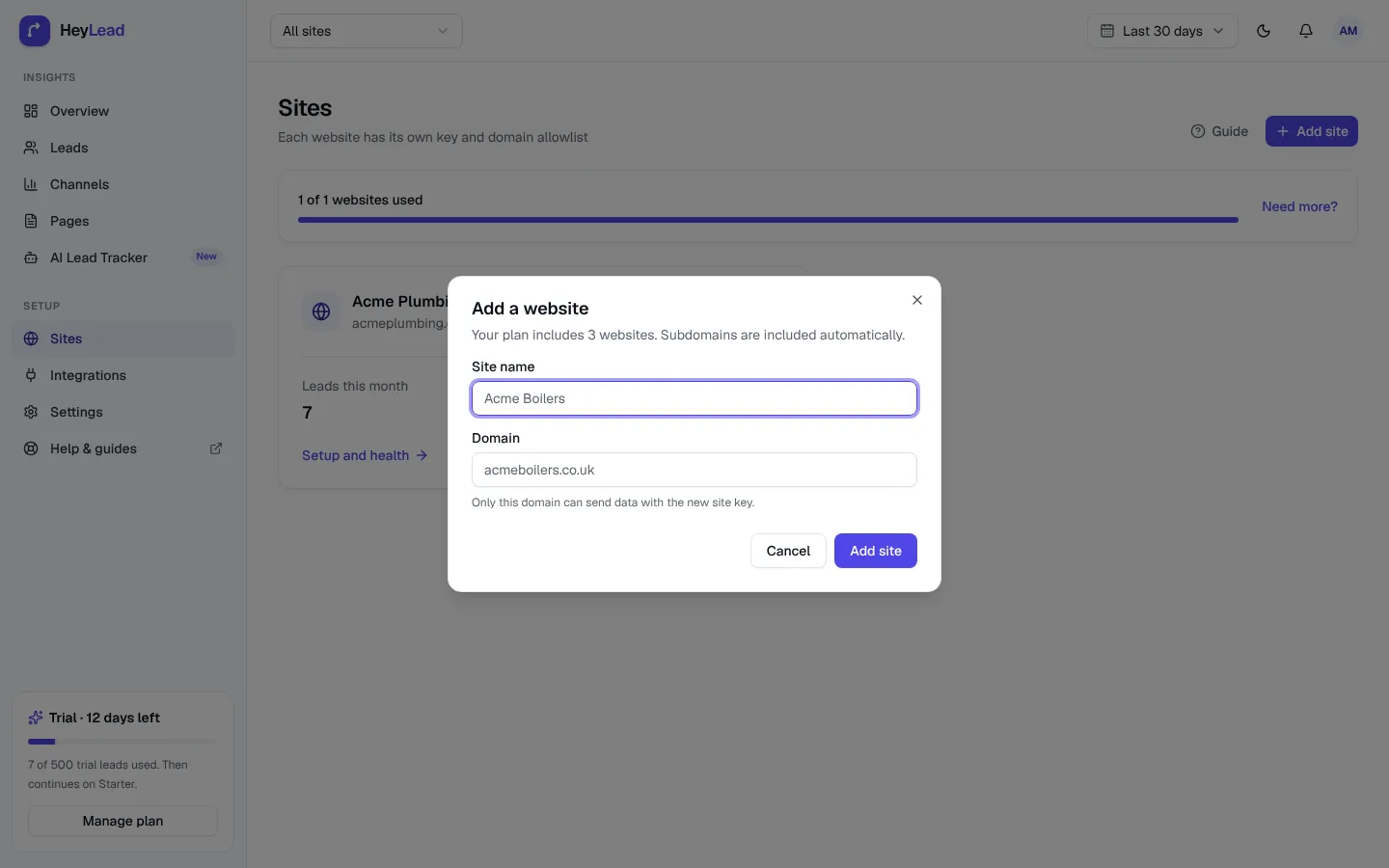
HeyLead's multi-site plans track 10, 25 or 50 websites with unlimited leads in one account. Each site gets its own key, and every report can show one site or all of them together. See the pricing page for current plan prices.
How do you compare locations fairly?
Compare locations by leads, customers and cost per customer, using the same channel names everywhere, and allow for differences in local competition and population. A city-centre branch will always get more enquiries than a small-town one; what matters is efficiency and growth.
| Measure | Formula | What it tells you |
|---|---|---|
| Leads per location | Count of leads by location | Overall demand per branch |
| Lead-to-customer rate | Customers ÷ leads per location | How well each branch follows up and converts |
| Cost per customer | Local spend ÷ customers per location | Efficiency of each location's marketing |
| Channel mix per location | Share of leads by channel per branch | Which local tactics work and can be copied |
| Growth | Leads this month ÷ same month last year | Which branches are improving |
Look for patterns, not just rankings. If one branch gets twice the share of leads from its Maps listing, find out what it does differently, such as more reviews, better photos or faster replies, and copy it elsewhere.
How do you give location managers access to their numbers?
Give location managers access to the numbers so they can act on them, not just head office. Shared reports turn tracking from an audit into a tool managers use every week.
In HeyLead you can invite team members as admins, members or viewers, and every report can be filtered by website. Multi-site plans include 10, 20 or unlimited team members depending on the plan. Separate client workspaces, where a franchisee would see only their own sites, are coming soon; until then, a viewer role with a site filter covers most reporting needs.
How do you split national and local marketing budget?
Split national and local budget by looking at which channels drive leads across all locations and which ones only help particular branches. National channels, such as brand search, social and content, should be judged on the business as a whole; local channels, such as each Maps listing and local ads, on each location.
| Budget type | Typical channels | Judge it by |
|---|---|---|
| National | Brand Google Ads, social, content, email | Total leads and customers, cost per customer |
| Local | Maps listings, local Google Ads, local offers | Leads and cost per customer for that location |
| Shared | Co-op ads funded by head office and franchisees | Leads by location, so costs can be shared fairly |
With consistent campaign names, the national campaigns show their total effect, and the local ones show each branch's return. That makes co-op marketing fairer too: each franchisee's share can follow the leads their location actually received.
How do you onboard a new location?
Onboarding a new location should take minutes, not a week of back-and-forth, if the naming scheme and tracker are already in place. Turn the setup into a short checklist that every new branch follows from day one.
- Create the location page, or add the new website to your account with its own key.
- Install the tracker on the new site, if it is separate.
- Claim and verify the Google Business Profile, and tag its links with the location in the campaign.
- Create local ad campaigns using the location naming format.
- Invite the location manager with the right role.
- Check after a week that leads appear under the new location.
Starting every branch the same way means its numbers are comparable from the first month, and nobody has to clean up inconsistent tags later.
What about branches where most leads phone in?
Some branches get most of their leads by phone, especially for urgent services. A website lead tracker records forms, not calls: HeyLead does not track phone calls. For phone-heavy locations, add a short callback or booking form next to each branch's number, ask callers where they found you, or use a call tracking service with a number per location. Combined with form tracking, that gives head office a complete picture across every branch.
How do you set up multi-location lead tracking, step by step?
Setting up multi-location lead tracking takes a few minutes per website plus a few minutes per Maps listing.
- Agree the naming scheme. One sheet with sources, mediums and the location format for campaigns.
- Install the tracker everywhere. One script, plugin or Google Tag Manager tag on every location site or the shared site.
- Add each website to one account. One key per site, all reported together.
- Tag every Google Business Profile. Same source and medium, location in the campaign.
- Rename ad campaigns by location. Local campaigns include the location; national ones say national.
- Tag local social and email links. Same scheme, location in the campaign.
- Invite managers. Viewer or member roles, with reports filtered by their site.
- Review monthly. Compare cost per customer and channel mix by location.
What are the most common multi-location tracking mistakes?
- Different tags per location. The same channel under different names can't be added up.
- Untagged Maps listings. Each branch's biggest source disappears into organic search.
- Location in the source instead of the campaign.
utm_source=gbp-leedssplits one channel into dozens; keep the location in the campaign. - Comparing raw lead counts. Population and competition differ; compare rates and cost per customer.
- Separate tools per branch. Numbers from different tools never match; use one tracker everywhere.
- Keeping reports at head office. Managers improve what they can see.
Key takeaways
- Multi-location tracking is harder because every branch multiplies listings, campaigns and people.
- Keep source and medium identical everywhere and put the location in the campaign.
- Tag every Google Business Profile and name ad campaigns by location.
- Track all location websites in one account and filter reports by site.
- Compare locations by conversion rate and cost per customer, and share the numbers with managers.
See how HeyLead works for local services and agencies, how lead source tracking works across every channel, or compare plans on the pricing page.
Frequently asked questions
How do multi-location businesses track leads by location?
Install one lead tracker across all location pages or websites, tag every Google Business Profile with the same source and medium and the location in the campaign, name ad campaigns by location, and report leads and customers per location from one account.
How should I tag Google Business Profiles for several locations?
Use the same utm_source and utm_medium on every profile, such as gbp and organic, and put the location in utm_campaign, such as listing-leeds and listing-york. All profiles roll into one Google Business Profile channel, and the campaign report splits them by location.
Should each location have its own website?
Either works for tracking. One site with a page per location is simpler to manage; separate sites per branch or brand need a tracker that handles many websites in one account. HeyLead's multi-site plans cover 10, 25 or 50 websites with unlimited leads.
Can franchisees see only their own leads?
HeyLead lets you invite team members as admins, members or viewers, and filter every report by website. Separate client workspaces, where each franchisee would only see their own sites, are coming soon.
How do I compare location performance fairly?
Compare leads, customers and cost per customer per location, using the same channel names everywhere. Differences in local competition and population mean raw lead counts alone can mislead.
How do I track national ads that send people to different locations?
Tag national campaigns with one campaign name and let the landing page or location page show which branch each lead chose. The lead's landing page and form tell you which location they enquired with.
How long does setup take for many locations?
Installing the tracker takes a few minutes per website, or once if all locations share one site. Tagging Google Business Profiles is the main task and takes a few minutes per location with a shared naming scheme.