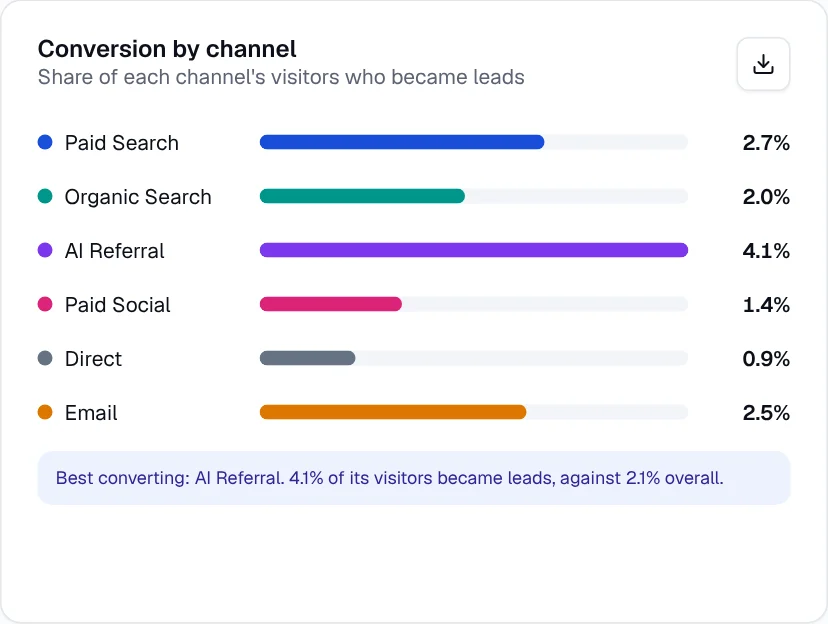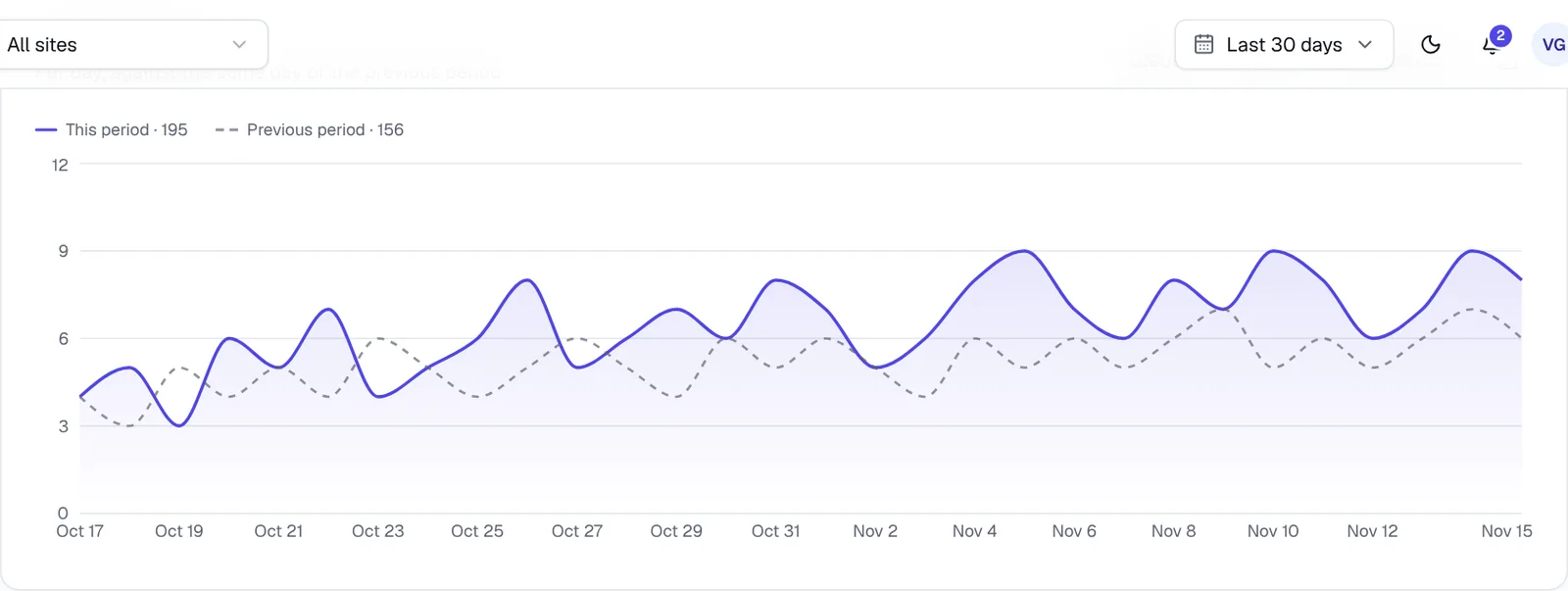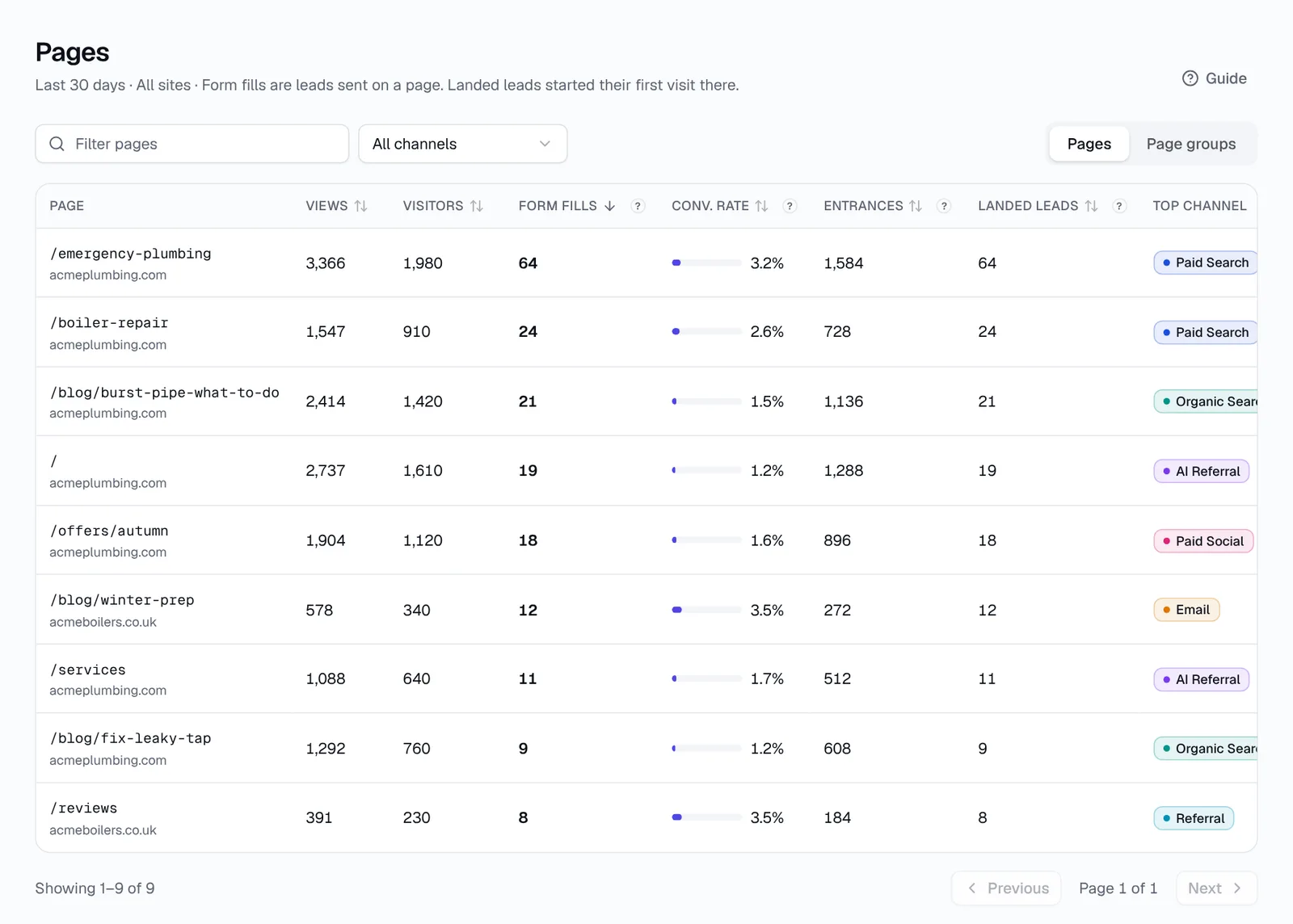
Quick answer
- Home service businesses lose track of where jobs come from because Google Ads, the Maps listing, directories like Angi and Yelp, and referrals all claim credit, and many leads phone in.
- The fix is to record the source of every website enquiry automatically, tag every link you control, handle phone calls separately, and count booked jobs, not just leads.
- Tag your Google Business Profile, directory and social links with UTM tags, and put QR codes with their own tags on vans, yard signs and leaflets.
- Phone calls need a call tracking number or a callback form; a website lead tracker like HeyLead records form enquiries, not calls.
- Mark each lead as won with the job value, and compare channels by cost per booked job, which is the number that decides where your budget goes.
Lead tracking for contractors means recording where every quote request and booked job came from: which Google Ads campaign, Maps listing, directory, social post or referral. For plumbers, HVAC companies and roofers, it shows which marketing actually fills the calendar, so you can stop paying for the channels that only send tyre-kickers.
Most home service businesses spend money in five or six places at once: Google Ads, Local Services Ads, the Google Business Profile, a couple of directories, maybe Facebook, plus word of mouth. Every one of them has a dashboard claiming credit for your work. Add the office asking "How did you hear about us?" and getting "Google" as the answer to everything, and nobody really knows which spend pays for itself.
This guide sets out the problem in plain terms, then a practical system to fix it: what to track, how to tag each channel, how to handle phone calls, and how to judge every channel by the jobs it books.
Why don't contractors know where their jobs come from?
Contractors lose track of job sources because their leads arrive through many channels at once, half of them by phone, and each platform counts its own results its own way. Without one place that records the source of every enquiry, the numbers from Google, Angi and Yelp overlap, contradict each other and can't be added up.
Here is what typically goes wrong:
- Every platform claims the same job. Someone searches, sees your Google ad, checks your reviews on Yelp, then clicks your Maps listing and fills in your quote form. Google Ads, Yelp and your Business Profile may each count that one job.
- Many leads phone in. An urgent leak or a broken boiler means a phone call, not a form. Calls usually leave no record of which ad or listing the caller saw.
- "How did you hear about us?" is unreliable. Customers say "Google" whether they clicked an ad, a Maps listing or a search result, and most forget by the time the van arrives.
- Your website reports say Direct. Many visits arrive without a clear source, so analytics files them under Direct and the enquiry lands in your inbox with no source at all.
- Nobody joins leads to jobs. Even when a source is known, few businesses record which enquiries became paid work, so the cheapest leads look like the best ones.
The result is that budget follows whichever salesperson or dashboard is most convincing, not the channel that books the most work.
What does not knowing your lead sources cost?
Not knowing your lead sources costs money in two ways: you keep paying for channels that don't book jobs, and you under-invest in the ones that do. The cost isn't the price of the tool; it is the budget you could move.
Here is an example with made-up numbers for a heating and plumbing company spending £3,000 a month:
| Channel | Monthly spend | Enquiries | Jobs booked | Cost per enquiry | Cost per booked job |
|---|---|---|---|---|---|
| Google Ads | £1,500 | 40 | 12 | £38 | £125 |
| Lead-selling directory | £1,000 | 50 | 5 | £20 | £200 |
| Facebook ads | £500 | 20 | 2 | £25 | £250 |
By cost per enquiry, the directory looks like the winner. By cost per booked job, Google Ads costs less than two thirds as much. Without tracking, you would only have the first view, and you might move money the wrong way.
Your own numbers will look different. The point is that you need jobs, not just enquiries, to decide.
What should a contractor track?
A contractor should track four things for every lead: the channel it came from, the campaign or listing, the page it landed on, and whether it became a paid job with its value. With those four, every marketing question you have can be answered from one report.
| What to record | Example | Why it matters |
|---|---|---|
| Channel | Paid Search, Google Business Profile, Directories | The big picture: where to spend |
| Campaign or listing | emergency-plumber, boiler-install, listing-leeds | Which ad, keyword or location works |
| Landing page | /emergency-plumber, /boiler-servicing | Which service pages turn visitors into enquiries |
| Outcome and job value | Won, £1,850 | Turns lead counts into revenue per channel |
Everything else, such as device or number of visits, is useful detail but not essential to start.
How do you track leads from each channel?
Each channel needs a slightly different setup, but the principle is the same everywhere: make sure every link you control carries a tag, and let your lead tracker record the source of every visitor automatically. This table covers the channels most home service businesses use.
| Channel | How to track it | What you'll see |
|---|---|---|
| Google Ads | Keep auto-tagging on and add UTM tags with your keyword | Paid Search, by campaign and keyword |
| Local Services Ads | Mostly in the LSA dashboard (calls and messages); website clicks tracked like Google Ads | Paid Search for website clicks |
| Google Business Profile | Add utm_source=gbp&utm_medium=organic to the website and booking links | A Google Business Profile channel |
| Angi, Yelp, Thumbtack, Checkatrade, Houzz | Tag your profile's website link where allowed; group the domains with a channel rule | A Directories channel |
| Facebook and Instagram ads | Add URL parameters in Ads Manager | Paid Social, by campaign |
| Nextdoor and local groups | Tag links you post | Organic Social or your own channel |
| Email and text reminders | Tag every link with utm_medium=email or sms | Email, by campaign |
| Vans, yard signs, leaflets | QR codes with their own UTM tags | An Offline channel |
| Referrals and repeat customers | Ask on the form, or give past customers a tagged link | Referral, or Direct if untagged |
Google Ads
Google Ads is usually the biggest spend and the easiest to track. Leave auto-tagging on so every click carries a gclid, and add a tracking template with utm_term={keyword} so you see the exact search term behind each lead. Our guide to which Google Ads keywords bring customers walks through the setup.
Your Google Business Profile
Your Maps listing often sends more enquiries than you expect, but without tags they blend into organic search. Add UTM tags to the website and booking links on the profile, and keep utm_source=gbp the same across every location so they roll into one channel. The Google Business Profile guide shows every link to tag.
Directories
Directories work in two ways. Leads you pay for inside the directory's own app, such as Angi or Thumbtack requests, are counted in that directory's dashboard and never touch your website. Visitors who click from your profile through to your site arrive as a referral from the directory's domain. Tag the website link on each profile where the directory allows it, and create one channel rule that groups all directory domains under Directories.
Vans, yard signs and leaflets
Offline marketing becomes trackable as soon as it has its own link. Put a QR code on each van, sign or leaflet that opens your site with tags such as utm_source=van&utm_medium=offline&utm_campaign=van-2026. Scans then arrive with that tag, and a rule matching utm_medium equals offline groups every printed source into one channel.
How do you judge a lead-selling directory or agency?
Before you renew a directory, a pay-per-lead service or a marketing agency, ask for numbers you can check against your own tracking. Their dashboards count what helps them; your tracker counts what helps you.
Questions worth asking:
- Is each lead exclusive? Shared leads go to several businesses at once, which lowers the chance of booking the job.
- How do they count a lead? A profile view, a click and a quote request are very different things.
- Can you return bad leads? Wrong numbers, out-of-area jobs and spam should not be charged.
- What did their leads book last quarter? Compare their claim with the jobs your own tracker attributes to them.
If the numbers don't match, trust the one tied to booked jobs. A month or two of tracking every lead to its outcome is usually enough to see whether a service pays for itself.
How should contractors track phone calls?
Phone calls need their own tracking because a website lead tracker only sees what happens on the website. HeyLead records form enquiries with their full source; it does not record phone calls, and it doesn't count taps on your phone number. There are three practical ways to cover calls.
| Option | How it works | Best for | Trade-off |
|---|---|---|---|
| Call tracking service | Shows a different phone number per channel or per visitor and records each call | Businesses where most leads phone in | Extra monthly cost per number |
| Callback or quote form | A short form for "Call me back" or "Get a quote" next to the phone number | Moving some calls online, at no extra cost | Not everyone will use it |
| Ask, and write it down | The office asks every caller and records the answer in the job system | Very small businesses | Less reliable, and easy to skip |
Many contractors combine the first two: a call tracking service for urgent jobs that always phone, and a callback form that turns other calls into tracked website leads. If most of your work arrives by phone, compare call tracking tools such as CallRail or WhatConverts; our comparison pages say honestly where they are the better fit.
How do you turn leads into booked jobs and revenue?
You turn leads into jobs and revenue by recording what happened to each enquiry: whether you quoted, won or lost it, and what the job was worth. Once outcomes are recorded, your reports show revenue and cost per booked job for every channel, not just a count of enquiries.
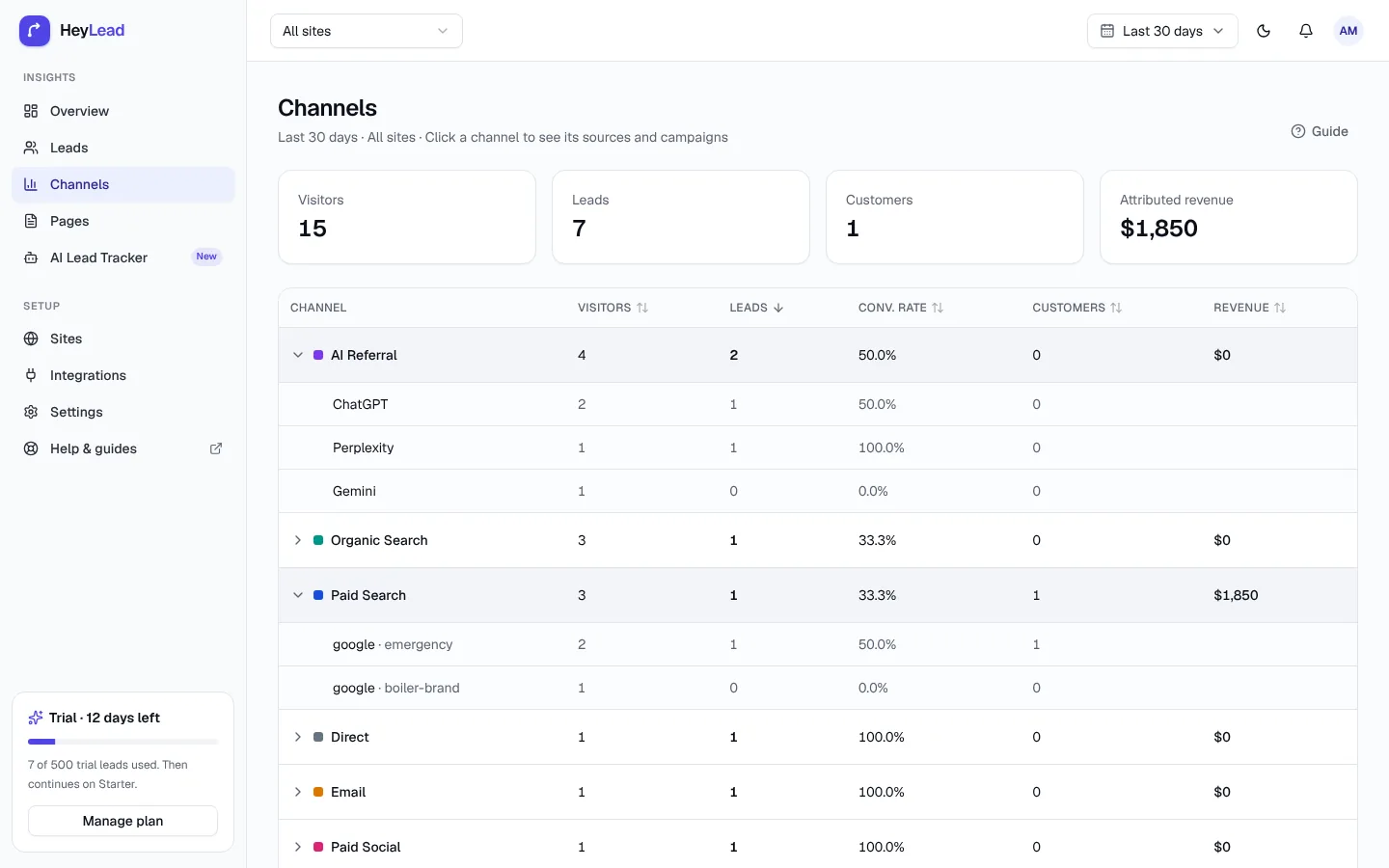
In HeyLead, each lead has a status, such as new, qualified, customer or lost, and a deal value. When a quote is accepted, mark the lead as a customer and enter the job value. The Channels report then shows customers and attributed revenue next to leads, by channel and campaign.
Then work out the number that matters:
| Measure | Formula | What it tells you |
|---|---|---|
| Cost per enquiry | Spend ÷ enquiries | How cheaply a channel brings in contacts |
| Booking rate | Jobs booked ÷ enquiries | How good those contacts are |
| Cost per booked job | Spend ÷ jobs booked | What a paying customer costs on each channel |
| Return on spend | Revenue from the channel ÷ spend | Whether the channel pays for itself |
Review it monthly. Move budget towards channels with the lowest cost per booked job and the highest return, and cut or renegotiate the rest.
How quickly should you reply to new leads?
Speed matters as much as tracking, because a homeowner with a burst pipe usually books whoever answers first. Make sure every website enquiry reaches the right person straight away, with enough context to reply well.
HeyLead can email you every new lead the moment it arrives, with its source and the page the person filled in. Knowing that an enquiry came from your emergency plumber ad, or from your Maps listing in a particular town, helps the office prioritise and respond in the right tone.
How do you track leads across several towns or service areas?
Businesses that cover several towns, or run more than one branch, should be able to see which area each enquiry came from as well as which channel. The simplest way is to keep channels the same everywhere and put the location in the campaign or landing page.
- One Google Business Profile per branch: keep
utm_source=gbpandutm_medium=organicidentical on every profile, and put the town in the campaign, such asutm_campaign=listing-leeds. All profiles roll into one channel, and the campaign report splits them by town. - Area landing pages: if you have pages such as /plumber-leeds and /plumber-york, the Pages report shows which areas turn visitors into enquiries.
- Google Ads by area: name campaigns by town, such as
emergency-leeds, so cost per booked job can be compared area by area. - Separate websites per brand: HeyLead's multi-site plans track up to 50 websites in one account, with reports per site or combined.
How do you set up lead tracking for a contractor website?
Setting up lead tracking for a contractor website takes under 30 minutes for most businesses. Here are the steps in order.
- Install a lead tracker. With HeyLead, install the WordPress plugin, paste one line into your site settings, or add it through Google Tag Manager. Your existing quote and contact forms are found automatically.
- Tag your Google Business Profile. Add UTM tags to the website and booking links on every location.
- Tag your directory profiles. Add tagged website links where each directory allows it, then create a Directories channel rule.
- Check Google Ads. Make sure auto-tagging is on and add a tracking template with your keyword.
- Make QR codes for offline marketing. One tagged link per van, sign or leaflet run.
- Cover phone calls. Add a callback form next to your phone number, and decide whether you need call tracking.
- Record outcomes. Mark won jobs as customers with their value every week.
- Review monthly. Compare cost per booked job by channel and move budget accordingly.
What are the most common lead tracking mistakes contractors make?
- Judging channels by enquiries, not jobs. Cheap leads that never book cost more than expensive ones that do.
- Leaving the Maps listing untagged. Its enquiries then disappear into organic search, and you undervalue it.
- Trusting every platform's own numbers. Google, directories and Facebook each count the same job. Use one tracker as the single source of truth.
- Ignoring phone calls. If most leads phone in and you only track forms, half the picture is missing. Add call tracking or a callback form.
- Forgetting offline marketing. Vans, signs and leaflets can be tracked with tagged QR codes, but only if each one has its own link.
- Never recording outcomes. Without marking won jobs, you can't see revenue or cost per job by channel.
- Tagging links between your own pages. UTM tags on internal links overwrite the real source. Only tag links that point to your site from elsewhere.
Key takeaways
- Contractors lose track of job sources because several platforms claim the same work and many leads phone in.
- Track four things per lead: channel, campaign or listing, landing page and job outcome.
- Tag your Google Business Profile, directory profiles, social links and QR codes so every source is separated.
- Phone calls need a call tracking service or a callback form; a website lead tracker covers forms.
- Decide budgets by cost per booked job and revenue per channel, not by number of enquiries.
You can see how HeyLead does this on the local services solution page, read how lead source tracking works across every channel, or check the pricing for a single website.
Frequently asked questions
How do plumbers and HVAC companies track where leads come from?
Install a lead tracker on the website so every quote or contact form arrives with its channel and campaign, tag the links on your Google Business Profile and directory listings with UTM tags, and use a call tracking number or a callback form for phone leads. Then mark which leads became paid jobs.
Can I track phone calls with HeyLead?
No. HeyLead records form enquiries from your website, with their full source and journey. For phone calls, use a call tracking service with dynamic numbers, or offer a short callback form so callers can leave their details online and be tracked like any other lead.
How do I track leads from Angi, Yelp, Thumbtack or Checkatrade?
Leads that stay inside a directory's own app are counted in that directory's dashboard. Visitors who click through to your website arrive as a referral from the directory's domain, so add UTM tags to your profile's website link where allowed and create a Directories channel rule to group them.
Can I track Google Local Services Ads leads?
Mostly through Google itself. Local Services Ads leads usually call or message you from inside Google, so they appear in your Local Services Ads dashboard, not on your website. Visitors who click through to your site from an ad are tracked like other Google Ads clicks.
How do I track leads from van wraps, yard signs and leaflets?
Put a QR code on each one that links to your site with its own UTM tags, for example utm_source=van&utm_medium=offline. Every visitor who scans it arrives with that tag, and a custom channel rule can group all offline sources together.
What should a home service business measure, leads or jobs?
Jobs. A channel that sends lots of cheap enquiries can still lose money if few of them book. Track cost per booked job and revenue per channel, which needs you to mark each lead as won with its job value.
Are pay-per-lead directories worth it for contractors?
It depends on how many of their leads book. Pay-per-lead services often look cheap per enquiry but share the same request with several businesses, so the booking rate can be low. Track every directory lead to its outcome for a month or two, then compare cost per booked job with your other channels before renewing.
How long does it take to set up lead tracking for a contractor website?
Usually under 30 minutes. Installing HeyLead with the WordPress plugin or one script takes a few minutes, tagging your profile and directory links takes another 15, and existing quote forms are captured automatically with no changes.