Quick answer
- B2B and SaaS teams lose the source of demo requests because buyers research for weeks across LinkedIn, search, review sites and AI assistants, and CRMs record the source as Offline or Direct.
- Record the first touch and the last touch of every demo request, with campaign and landing page, and pass both to the CRM with each lead.
- Hidden fields such as lo_first_channel and utm_source carry the source into HubSpot, Salesforce or Pipedrive forms; Zapier or a webhook sends it from HeyLead.
- LinkedIn ad clicks carry a li_fat_id click ID and should also carry UTM tags so campaigns and audiences are separated.
- Judge channels by pipeline and closed revenue, which means marking deals won with their value.
B2B and SaaS teams can track where demo requests come from by recording the first touch and the last touch of every visitor who fills in a demo or trial form, with the campaign and landing page, and passing that source to the CRM with the lead. It shows which channels create pipeline and which ones close it.
B2B buyers rarely click an ad and book a demo the same day. They read a blog post, see a LinkedIn ad, check a review site, ask ChatGPT for alternatives, compare pricing and come back weeks later to request a demo, often from a different device. By then, the CRM records the source as Direct or Offline, and marketing can't show which spend created the pipeline.
This guide covers why the source gets lost, what to record, how to pass it to your CRM, and how to judge channels by revenue.
Why do B2B teams lose the source of demo requests?
B2B teams lose the source of demo requests because buying journeys are long, involve several channels and people, and the CRM only sees the final form fill. Unless something records each visitor's journey and passes it with the lead, the original source is gone by the time sales gets the contact.
The usual problems:
- Long research periods. Weeks or months can pass between the first visit and the demo request, longer than many tools remember.
- Many channels per buyer. Content, LinkedIn, review sites, webinars, AI assistants and retargeting all play a part.
- CRM source fields go wrong. Forms submitted without the CRM's tracking, integrations and imports record Offline or Direct. Our guide on why your CRM says Direct covers the causes.
- Last click gets all the credit. The retargeting ad or branded search before the demo looks like the hero, while the content that created interest looks worthless.
- Pipeline isn't tied to source. Even when the source is known, deals and revenue are rarely reported by it.
The result is budget that follows last-click numbers and cuts the channels that actually start buying journeys.
What should B2B and SaaS teams track?
B2B and SaaS teams should track six things for every demo or trial request: first-touch channel, last-touch channel, campaign, landing page, the number of visits before converting, and the deal outcome with its value.
| What to record | Example | Why it matters |
|---|---|---|
| First-touch channel | Organic Search, AI Referral, LinkedIn | Which channels create awareness and pipeline |
| Last-touch channel | Paid Search (brand), Email, Paid Social | What converts researchers into demo requests |
| Campaign | linkedin-cfo-q4, g2-comparison | Which campaigns and audiences work |
| Landing page | /blog/guide, /vs/competitor, /pricing | Which content starts and closes journeys |
| Visits before demo | 6 visits over 21 days | How long research takes for your buyers |
| Outcome and deal value | Closed won, $24,000 ARR | Pipeline and revenue by channel |
How do first touch and last touch differ for B2B?
First touch is the source of the visit that first brought someone to your site, and last touch is the source of the visit when they requested a demo. In B2B the two are often completely different, which is why you need both.
| Question | Look at | Typical answer |
|---|---|---|
| Which channels create new pipeline? | First touch | Content, organic search, AI assistants |
| What turns researchers into demo requests? | Last touch | Comparison pages, retargeting, email |
| Should we keep investing in content? | First touch | Content-sourced pipeline and revenue |
| Which campaigns should get more budget this month? | Both | Revenue by first and last touch |
HeyLead stores every visit in a lead's journey, so you can switch between first touch, last touch and the full timeline. The first touch vs last touch guide goes deeper, and our B2B lead attribution page shows how it works across long sales cycles.
How do you track demo requests from each channel?
Each channel needs its links tagged where you control them, while search, referrals and AI assistants are recognised automatically. This table covers the channels most B2B and SaaS teams use.
| Channel | How to track it | What you'll see |
|---|---|---|
| LinkedIn ads | UTM tags with campaign and audience; keep li_fat_id | Paid Social, by campaign |
| Google Ads (brand and non-brand) | Auto-tagging plus a keyword tracking template | Paid Search, by campaign and keyword |
| Organic search and content | Tracked automatically | Organic Search, by landing page |
| AI assistants | Recognised automatically | AI Referral, by assistant |
| Review sites (G2, Capterra) | Tag your profile links where allowed; group with a channel rule | Referral, or a Review sites channel |
| Webinars and events | Tag registration and follow-up links | Email or Referral, by campaign |
| Partner and affiliate links | A tagged link per partner | Referral or Affiliates |
| Outbound and sales emails | Tag links in sequences and signatures | Email, by campaign |
LinkedIn ads
LinkedIn is often the biggest paid channel for B2B. Add UTM tags to every ad URL, putting the campaign in utm_campaign and the audience or creative in utm_content. HeyLead treats clicks carrying LinkedIn's li_fat_id click ID, or a paid medium from LinkedIn, as Paid Social.
AI assistants
More B2B buyers now ask ChatGPT, Perplexity or Copilot for software recommendations and alternatives. Those visits are labelled AI Referral with the assistant's name, so you can see whether AI search creates pipeline. Our AI referral tracking guide explains how detection works and its limits.
Review sites and comparisons
Review sites like G2 and Capterra often send visitors late in the journey. Tag the website link on your profiles where the site allows it, and create a channel rule that groups review-site domains into their own channel. Comparison pages on your own site, such as /vs/competitor, show up in the landing page report.
How do you get the source into HubSpot, Salesforce or Pipedrive?
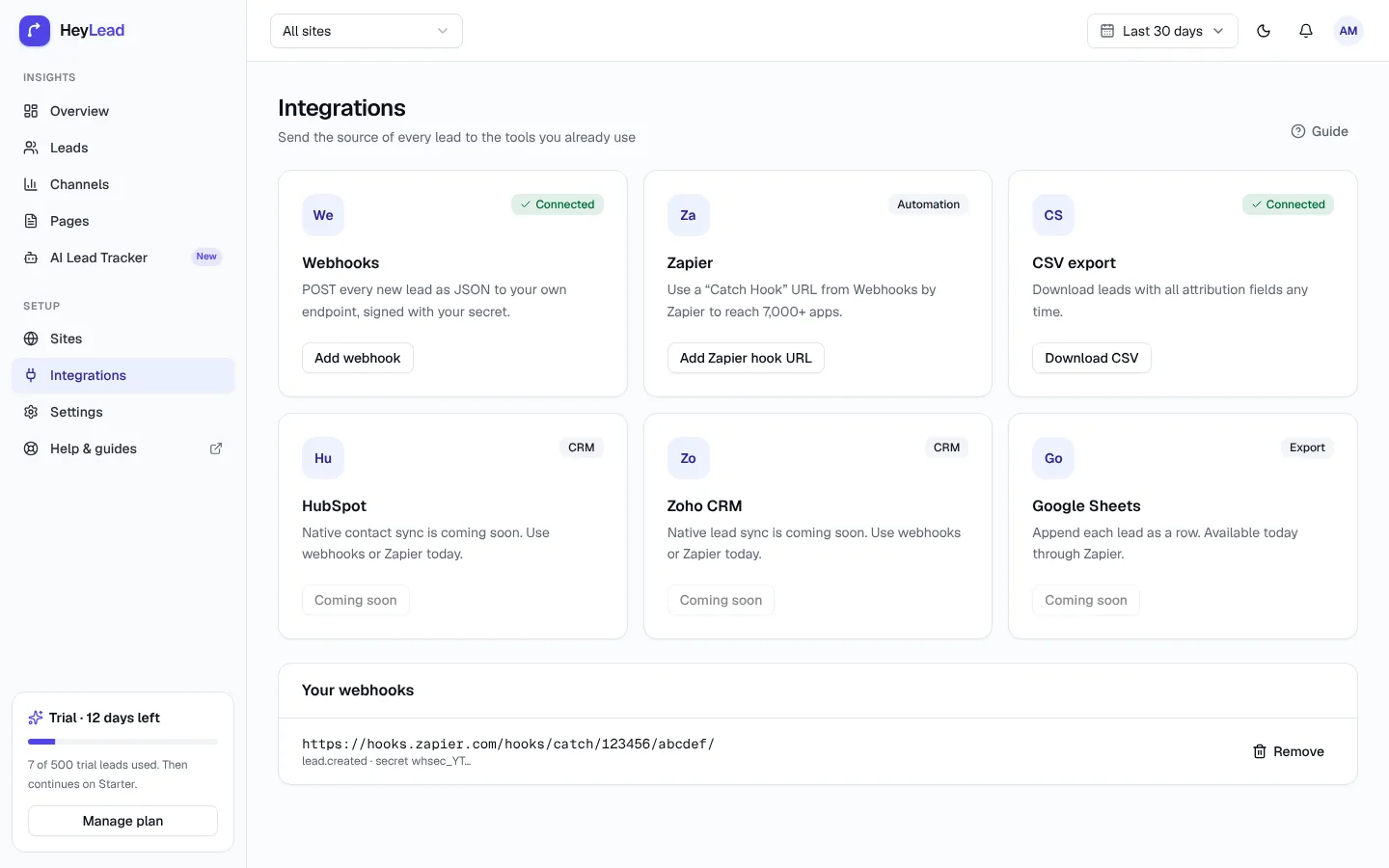
You get the source into your CRM in one of two ways: let the CRM's own form receive it through hidden fields, or send each lead from your lead tracker to the CRM through Zapier or a webhook. Both put the channel, campaign and first touch on the contact record.
| Method | How it works | Best when |
|---|---|---|
| Hidden fields | Add hidden fields such as utm_source and lo_first_channel to the form; HeyLead fills them | Your forms already write to the CRM |
| Zapier | HeyLead sends each new lead to a Zap that creates or updates the CRM record | You want no form changes |
| Webhook | HeyLead posts each lead as signed JSON to your own endpoint | You have a developer and your own integration |
| CSV export | Download leads with every attribution field | One-off analysis or imports |
Native HubSpot sync is on the way; until then, hidden fields or Zapier cover HubSpot fully. HeyLead lists the exact hidden fields to add on each site's Forms tab. For custom React or Next.js sign-up flows, developers can read the same values with HeyLead.fields() and send them with the sign-up request.
How do you measure pipeline and revenue by channel?
You measure pipeline and revenue by channel by recording each lead's outcome and deal value, then reporting them by first and last touch. Demo counts alone hide the difference between a channel that books small deals and one that books large ones.
| Measure | Formula | What it tells you |
|---|---|---|
| Demo request rate | Demo requests ÷ visitors | How well pages convert |
| Demo to opportunity rate | Qualified opportunities ÷ demo requests | Lead quality by channel |
| Pipeline by first touch | Sum of open deal value by first-touch channel | Which channels create demand |
| Revenue by last touch | Closed-won value by last-touch channel | Which channels close demand |
| Cost per opportunity | Spend ÷ qualified opportunities | Efficiency of paid channels |
In HeyLead, mark leads as qualified, customer or lost and add a deal value; the Channels report then shows customers and attributed revenue by channel. If deal stages live in your CRM, the source fields you passed in let you build the same report there.
How do you track free trials and product sign-ups?
Free trials and product sign-ups need the same source tracking as demo requests, because for product-led SaaS the sign-up is the lead. The difference is that sign-ups often happen in an app or a custom flow rather than a simple form.
| Sign-up setup | How the source is captured |
|---|---|
| Sign-up form on your marketing site | Captured automatically with first and last touch |
| Custom React or Next.js sign-up flow | Captured automatically, or read with HeyLead.fields() and stored with the account |
| Sign-up on an app subdomain | Subdomains are included with the site, so the visitor is remembered |
| Sign-up through a marketplace or partner | Tag the listing link; check the marketplace's own reports |
Store the first-touch channel and campaign on each new account. Then, when a trial converts to paid weeks later, you can report revenue by the channel that created the trial, not the one that happened to send the last email.
How do you report attribution to leadership?
Report attribution to leadership with a few clear numbers per channel, using both first and last touch, and a short explanation of what changed. Executives want to know where pipeline comes from and where the next dollar should go, not every metric.
A simple monthly report covers:
- Pipeline created by first-touch channel, with the change from last month.
- Closed revenue by last-touch channel, so the converting channels get credit too.
- Cost per qualified opportunity for each paid channel.
- Top five landing pages that start journeys, and the top five that convert.
- One recommendation, such as moving budget from one campaign to another, with the numbers behind it.
Keep the definitions fixed from month to month. Changing what counts as a qualified opportunity or a channel halfway through the year makes trends meaningless.
How do you track partners and integration marketplaces?
Partners, resellers and integration marketplaces can be a steady source of B2B pipeline, but their leads often arrive as plain referrals or get credited to whatever channel came last. Give every partner and marketplace listing its own tagged link, with utm_medium=referral or affiliate and the partner in utm_source, and create a channel rule that groups them. Then partner-sourced pipeline can be reported and rewarded like any other channel.
How do you set up demo source tracking, step by step?
Setting up demo source tracking takes about an hour for most B2B websites.
- Install a lead tracker. Add HeyLead with one script, Google Tag Manager or the WordPress plugin. Demo, trial and contact forms are found automatically, including React and Next.js forms.
- Tag LinkedIn and other ads. UTM tags on every ad URL, with campaign and audience.
- Check Google Ads. Auto-tagging on and a keyword tracking template.
- Group review sites and partners. Channel rules for G2, Capterra and partner domains.
- Pass the source to your CRM. Hidden fields on CRM forms, or a Zap or webhook from HeyLead.
- Tag outbound and webinar links. Sequences, signatures and follow-up emails.
- Record outcomes. Mark won deals with their value, in HeyLead or your CRM.
- Review monthly. Compare pipeline by first touch and revenue by last touch.
What are the most common demo tracking mistakes?
- Reporting last click only. It undervalues content, organic search and AI assistants that start journeys.
- Trusting the CRM's source field. Offline and Direct usually mean the source was lost, not that buyers came from nowhere.
- Untagged LinkedIn ads. Without campaign and audience tags, you can't compare them.
- Ignoring AI search. Buyers asking assistants for alternatives are a growing source, but only visible if labelled.
- Counting demos, not revenue. A channel with fewer, larger deals can be the best one.
- Tagging internal links. UTM tags between your own pages overwrite the real source.
Key takeaways
- B2B demo sources get lost because journeys are long and the CRM only sees the final form.
- Track first touch, last touch, campaign, landing page, visits and deal value for every demo request.
- Tag LinkedIn ads, outbound links and partner links; search and AI assistants are recognised automatically.
- Pass the source into the CRM with hidden fields, Zapier or a webhook.
- Judge channels by pipeline and closed revenue, not demo counts.
See how HeyLead supports SaaS companies, how B2B lead attribution works, or check pricing.
Frequently asked questions
How do B2B companies track where demo requests come from?
Install a lead tracker on the website so every demo form arrives with its first and last touch, campaign and landing page, tag ads and outbound links with UTM tags, and send the source to the CRM with each lead through hidden fields, Zapier or a webhook. Then mark which deals closed.
Why does HubSpot say Offline sources or Direct traffic?
HubSpot labels a contact's source from what its own tracking saw. Forms submitted without its tracking cookie, leads imported or created by integrations, and visits with no referrer end up as Offline sources or Direct traffic. Passing the source with hidden fields on each form fixes it.
Should B2B teams use first touch or last touch?
Both. First touch shows which channels create awareness and pipeline, such as content or AI search. Last touch shows what converts researchers into demo requests, such as retargeting or a comparison page. Budget decisions need the two side by side.
How do I track LinkedIn ads leads?
Add UTM tags to every LinkedIn ad URL with the campaign and audience, and keep LinkedIn's click ID. HeyLead treats clicks with li_fat_id or a paid medium as Paid Social and shows the campaign on each lead.
Does HeyLead integrate with HubSpot and Salesforce?
Native HubSpot sync is coming soon. Today you send leads with their source to HubSpot, Salesforce, Pipedrive and other CRMs through Zapier or a signed webhook, or let the CRM's own form receive the source through hidden fields that HeyLead fills.
Can I track sign-ups from a custom React or Next.js form?
Yes. HeyLead captures forms built with React, Next.js, Vue and other frameworks. Developers can also read the same values used for hidden fields with HeyLead.fields() and send them with their own sign-up request.
How do I measure pipeline by channel?
Mark each lead's outcome and deal value in your lead tracker or CRM. With values recorded, reports show pipeline and revenue by first and last touch channel, not just demo counts.